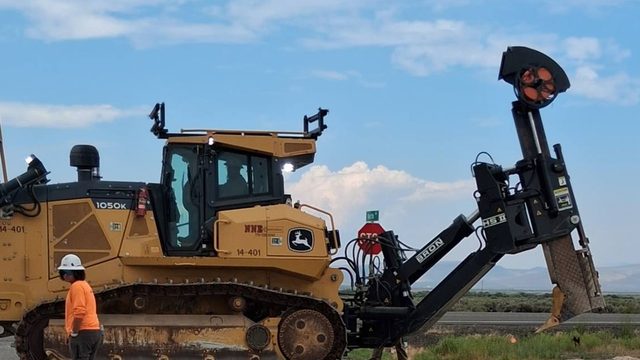
A crew rolls a cable plow along the highway shoulder, laying an orange pipe into the ground. Weeks later, a technician pulls a strand of glass, about as thin as a human hair, through that pipe. It ends in a small white box on the wall of a home miles away. When the family starts a video call with a grandchild across the country, their words travel as flashes of light through that same kind of glass, across the state, maybe under an ocean, and back again, in less time than it takes to blink. Numu Communications builds and runs networks like this for tribal and rural communities. This class follows the light in four parts: what fiber optic cable is, where fiber is used, the highway system it travels on, and what a fiber network to your home looks like.
Start hereWelcome
What you will learn
- Describe what an optical fiber is made of and how light stays inside it
- Give three examples of places fiber is used, including the Pacific cables that land in Oregon and the network at Mackay Stadium
- Explain the backbone, middle mile, and last mile using the highway example
- Trace a fiber network from the OLT (Optical Line Terminal) through a splitter to the ONT (Optical Network Terminal) on a home
In this class
Part 1What Is Fiber Optic Cable?
Fiber is a strand of very pure glass that carries data as flashes of light. Start with what it is made of and why the light stays inside.
Read all 6 details
- 1The core carries the light. The core is the very center of the fiber, a thread of extremely pure glass. In the fiber used for long-distance and home internet, called single-mode fiber, the core is only about 9 microns across. A micron is one millionth of a meter.
- 2The cladding keeps the light in. The cladding is a layer of slightly different glass wrapped around the core. Because the two glasses bend light differently, light that hits the edge of the core bounces back in instead of leaking out.
- 3The coating protects the glass. A thin plastic coating keeps out water and scratches. Installers strip it off only when they join two fibers together.
- 4Thinner than you would think. Most glass fibers are 125 microns across, about 5 thousandths of an inch. That is a bit larger than a typical human hair. You can bend it gently without breaking it.
- 5Many fibers in one cable. A cable holds many fibers, from a few to hundreds or more. They sit in color-coded tubes so a technician can find fiber number 37 of 144, in the field, in the dark, years later.
- 6The jacket and strength yarn. The outer jacket keeps out sun, water, and rodents. Strong yarn or rods inside take the pulling force when the cable is installed, so the glass does not have to.
Read all 6 details
- 1A tiny laser sends the signal. At one end, a small laser turns electrical data into flashes of light. Most fiber systems use infrared light that our eyes cannot see.
- 2Light bounces and stays inside. When light hits the edge of the core at a low angle, it reflects back in, like a skipping stone that never leaves the water. Scientists call this total internal reflection. It is why the light can follow the fiber around gentle bends.
- 3Flashes are ones and zeros. Light on means 1. Light off means 0. These are the same bits from our class on how computers speak. Fiber equipment flashes billions of times every second.
- 4The receiver turns light back into electricity. At the far end, a light sensor turns the flashes back into electrical signals that a computer, phone, or router can use.
- 5Safety: never look into a fiber. The light is usually invisible, but it can still harm your eyes. Never look into the end of a fiber or a fiber port, even if it seems dark. Leave fiber connections to trained technicians.
- 6Why glass works so well. In 1970, scientists at Corning made glass so clear that light could travel a long way through it. Modern fiber is clear enough that signals can travel miles before they need a boost.
Read all 5 details
- 1Copper came first. Telephone lines and cable TV lines are made of copper. They carry data as electricity. DSL (Digital Subscriber Line) internet runs over old phone lines, and many cable internet systems mix fiber with copper coaxial cable.
- 2Fiber carries light instead. Fiber sends data as pulses of light through glass. The federal BroadbandUSA program describes fiber as having the fastest download and upload speeds on average, with very low delay.
- 3Fast both ways. Many copper services are fast for downloading but slow for uploading. Fiber can be fast in both directions, which matters for video calls, telehealth, online classes, and sending big files.
- 4Lightning and electrical noise. Glass does not conduct electricity, so lightning, power lines, and motors do not add noise to the light the way they can on copper.
- 5The weak spot is the cable itself. Fiber is very reliable, but a backhoe, a falling tree, or a fire can cut or crush a cable. That is why careful network builders plan a second path where they can.
Part 2Fiber Is Everywhere
Fiber connects cell towers, schools, and clinics, crosses the Pacific to the Oregon coast, and runs through Mackay Stadium in Reno. Here are three places to see it.
Read all 6 details
- 1Cell towers. Your phone talks to the cell tower by radio. Then the tower's traffic often rides a fiber line back to the network, called backhaul. So a phone call may travel most of the way on fiber.
- 2Schools and libraries. Schools and libraries often have their own fiber connection, so hundreds of students can be online at once. They are called community anchor institutions.
- 3The network hub. Fibers from across town meet in a small building or cabinet full of equipment. From here, traffic heads out to the rest of the internet.
- 4Clinics and hospitals. Telehealth visits, X-ray images, and medical records move over fast, reliable connections, very often fiber.
- 5Homes and businesses. Fiber to the home, also called FTTH (Fiber to the Home) or FTTP (Fiber to the Premises), runs glass all the way to the side of the house.
- 6Town to town. Bigger fiber cables connect one town to the next, and to the large cables that cross the country and the oceans. We will follow those in the next part.
Read all 7 details
- 1Hillsboro: Oregon's cable hub. The city of Hillsboro, near Portland, calls itself the center of six trans-Pacific cables. Its data centers hold the equipment that receives the light from the ocean cables and hands the traffic to networks on land.
- 2Pacific City and Cloverdale. Two cables come ashore here on the north Oregon coast. New Cross Pacific (2018) connects Oregon with China, Japan, South Korea, and Taiwan. JUPITER (2020), owned by a group of companies including Amazon Web Services and Meta, lands at nearby Cloverdale and connects to Japan and the Philippines. The Hawaiki cable to Hawaii and the South Pacific also comes ashore at Pacific City.
- 3Bandon. On the south Oregon coast, the FASTER cable (2016), owned by a group that includes Google, connects Bandon with Japan and Taiwan.
- 4Across the Pacific. These cables are long. JUPITER is about 14,557 kilometers, more than 9,000 miles. Hawaiki is about 14,000 kilometers and reaches Hawaii, American Samoa, Tonga, New Zealand, and Australia.
- 5About as thick as a garden hose. In the deep ocean, a cable is about as wide as a garden hose, and the glass fibers inside are as thin as a hair. Near shore, where ships anchor and fish, it gets extra armor and is buried under the seabed.
- 6More than 99 percent of the traffic. Ocean cables carry more than 99 percent of the data that travels between continents. Worldwide, more than 600 cables are in service or planned. There are about 200 cable faults a year, about two-thirds caused by fishing boats and dragging anchors.
- 7The new route up U.S. 95. From the coast, fiber on land carries the traffic across the West. In northern Nevada, a new middle-mile fiber route runs along U.S. 95 from Winnemucca north to McDermitt and the Fort McDermitt Indian Reservation at the Oregon line. It is part of the state's High Speed Nevada middle mile network. The photo at the top of this class shows a crew plowing in conduit on that route. A video call from Winnemucca to family in Japan can ride land fiber to a cable station, cross the Pacific, and come back in a fraction of a second.
Read all 7 details
- 1A small city on game day. Mackay Stadium at the University of Nevada, Reno, seats 30,000 people. The record crowd was 33,391 in 1995, more than the population of most towns in northern Nevada. On game day, most of them carry a phone.
- 2The video board. In 2016 Mackay got a new video and sound system. The plan called for a high-definition video board about 64 feet wide and 36 feet tall, plus a 250-foot ribbon board along the east upper deck. Live replays and graphics need a fast, steady connection from the control room to the screen.
- 3TV in the suites, over the network. In 2021, Mackay's suite TV system was rebuilt to send 4K video over the computer network. Within two days of installation, all 57 suites were up and running.
- 4Tickets on your phone. Fans download their tickets to their phones, and scanners at each gate check them. The gates, the ticket scanners, and the food and drink stands all need a working network.
- 5Why fiber is the backbone. In large venues, fiber usually carries the long links from the network room to the video board, the press box, the suites, and the Wi-Fi radios in each section. Fiber carries huge amounts of data over long runs and does not pick up electrical noise from stadium lights and motors.
- 6Wi-Fi and cell signal for the crowd. When thousands of people post photos at the same moment, the network needs many radios close to the fans. Each one needs a fast connection back to the network room.
- 7For scale: an NFL stadium. The biggest new stadiums go much further. Mercedes-Benz Stadium in Atlanta, which opened in 2017, was built with nearly 4,000 miles of fiber and nearly 2,000 Wi-Fi access points, using a passive optical network, the same design you will see in part 4.
Part 3The BroadbandUSA Highway Example
BroadbandUSA, the federal broadband office, explains internet networks with a highway system: interstates, state highways, and city streets. Our middle mile example is the High Speed Nevada fiber route along U.S. 95 from McDermitt to Winnemucca. Then see how the roads get built.
Read all 7 details
- 1Under the ocean. The backbone reaches other continents through the ocean cables from Part 2.
- 2The backbone: interstate highways. BroadbandUSA, the federal broadband office, compares the internet backbone to interstate highways. Large fiber cables carry data across the country and around the world. They are usually owned by large telecommunications companies.
- 3Two roads are better than one. Good networks have more than one path, called path diversity. If a backhoe cuts one fiber, traffic takes the other road and people stay online.
- 4The middle mile: state highways. The middle mile carries data within a state or region. It connects a local area to the backbone, usually with fiber and sometimes with wireless links, and it needs enough room for everyone's traffic at the busiest time of day. Here is a real example from northern Nevada. Through the High Speed Nevada program, the Governor's Office of Science, Innovation and Technology (OSIT) is building the Nevada Middle Mile Network, about 2,500 miles of open-access fiber. One of its routes follows U.S. 95 for about 75 miles, from McDermitt at the Oregon line south to Winnemucca. At Winnemucca it meets the large fiber route along I-80, which leads to Reno and the rest of the internet. That U.S. 95 route is the middle mile for Numu's network.
- 5The area node. A local building or cabinet where the middle mile meets the last mile. In our example, the U.S. 95 middle mile ends at McDermitt and the Fort McDermitt Indian Reservation, and the local network fans out from there to homes and tribal buildings.
- 6The last mile: city streets. The last mile is the final stretch to homes, businesses, and anchor institutions such as schools and clinics. It can be fiber, cable, wireless, or satellite. It is often the most expensive part to build, especially where homes are far apart.
- 7Who builds the roads. Some providers build all three pieces. Others share. For example, the Dakota Carrier Network is a middle mile network started in 1996 by 15 local telephone cooperatives and companies in North Dakota, so local providers could reach the backbone together.
Read all 7 details
- 1On utility poles. Aerial fiber hangs from utility poles, tied to a steel support wire. It is often quicker and less costly to build where poles already exist, but more exposed to wind, ice, fire, and falling trees.
- 2Plowed into the ground. In open country, a cable plow cuts a narrow slot and lays plastic pipe called conduit, or the cable itself, in one pass. The photo at the top of this class shows a crew plowing in fiber conduit along U.S. 95 in Nevada.
- 3Conduit protects the cable. Fiber is often pulled or blown through plastic conduit. The conduit protects the glass and makes it easier to add or replace cable later without digging again.
- 4Boring under roads and rivers. To cross a road, a creek, or a driveway, crews use a drill that steers underground, called directional boring, so they do not have to cut the road.
- 5Handholes and splicing. Every so often the cable comes up into a buried box called a handhole or vault. Inside, technicians join fibers by melting their ends together with an electric spark, called fusion splicing, and seal the joints in a weatherproof case.
- 6Call 811 before you dig. 811 is the free national call-before-you-dig number. Utilities mark their buried lines so a shovel or post-hole digger does not cut a fiber, gas, or power line.
- 7Most of the cost is the digging. BroadbandUSA notes that most of the money in a fiber build goes to civil work: digging, plowing, and permits. Rights-of-way across tribal trust land also need permission. See our guide on the BIA rights-of-way process.
Part 4What a Fiber Network Looks Like
Most fiber-to-the-home networks use a design called a PON (Passive Optical Network). Follow it from the OLT in the fiber hut, through the splitter, to the ONT on your wall.
Read all 6 details
- 1The OLT in the fiber hut. The OLT (Optical Line Terminal) is the main fiber equipment at the provider's end. It sits in a central office or a small fiber hut. Each port on it sends light down one fiber toward a neighborhood.
- 2The feeder fiber. One feeder fiber carries everyone's data from the OLT out to the neighborhood. Basic systems reach about 20 kilometers, about 12 miles, from the OLT.
- 3The splitter: one fiber becomes many. A splitter is a small piece of glass, with no power and no moving parts, that copies one fiber's light onto many fibers. A common size is 1 to 32: one fiber in, 32 out. Because nothing in the field needs electricity, it is called a PON (Passive Optical Network).
- 4Terminals near the homes. Distribution fibers run from the splitter to small boxes on poles or in green pedestals near the road. Technicians connect each new customer here.
- 5The drop fiber. A thin drop fiber runs from the terminal to the side of the house, on a pole line or in a small buried conduit.
- 6The ONT on the home. The ONT (Optical Network Terminal) is the box that ends the fiber at your home. It turns the light into regular electrical signals your router can use.
Read all 6 details
- 1Two colors on one strand. Light going down to homes and light coming back up use different colors, or wavelengths, so both can share one glass strand at the same time without bumping into each other.
- 2Downstream: one message to everyone. The OLT sends one stream of data down the fiber, and the splitter copies it to every home. Each ONT picks out only the pieces addressed to it, a little like a mail carrier calling out names.
- 3Upstream: taking turns. Going back up, the homes take turns in tiny time slots that the OLT assigns, so their signals do not collide in the shared fiber. It happens so fast you never notice.
- 4Private, even though shared. Every home's ONT receives the light, but each one's data is encrypted. Your neighbor's ONT cannot read your data.
- 5Why sharing works. Most of the time, most homes are not using their full speed at once. Sharing one fiber among many homes keeps the cost of building fiber down while still giving each home very fast service.
- 6Shared speeds. GPON (Gigabit Passive Optical Network) shares about 2.5 gigabits per second down and 1.25 up. XGS-PON (10-Gigabit Symmetrical PON) shares about 10 gigabits each way. Newer systems reach about 50 gigabits.
Read all 7 details
- 1The fiber comes in. Outside, the drop fiber ends in a small box on the wall. A thin fiber cord comes through the wall to the ONT inside. Do not bend, pinch, or staple it: glass can crack if it bends too tightly.
- 2The ONT turns light into data. The ONT (Optical Network Terminal) changes the light signals into electrical signals for your router. In most cases your provider owns and manages it.
- 3Reading the lights. Most ONTs have a few status lights. A steady light marked PON or similar usually means the fiber link is up. A red light marked LOS (Loss of Signal) usually means no light is arriving, often a cut or unplugged fiber. Labels vary by brand, so check your provider's guide.
- 4Keep it powered. The ONT needs electricity. If the power goes out, the internet goes out too, unless the ONT has a battery backup. Ask your provider what backup options they offer.
- 5The Ethernet cable. An Ethernet cable connects the ONT to your router. This is the hand-off point between the provider's equipment and yours.
- 6The router and Wi-Fi. The router shares the connection with every device in your home, by Wi-Fi or by cable. A fiber connection can be faster than your Wi-Fi, so router placement matters.
- 7Plug in for the best speed. For speed tests, online classes, and video calls, plug the computer or TV into the router with an Ethernet cable when you can. Wi-Fi speed drops through walls and with distance.
The parts of a fiber network at a glance
| Part | Where it is | What it does |
|---|---|---|
| OLT (Optical Line Terminal) | Central office or fiber hut | Sends and receives light for many homes |
| Feeder fiber | From the hut to the neighborhood | Carries everyone's data on one fiber |
| Splitter | Cabinet or closure in the field | Copies one fiber's light to many fibers, with no power |
| Terminal | Pole or pedestal near the road | Where a technician connects your drop |
| Drop fiber | Terminal to your home | Brings fiber to the side of your house |
| ONT (Optical Network Terminal) | On or inside your home | Turns light into signals for your router |
| Router | Inside your home | Shares the connection by Wi-Fi and cable |
Getting fiber installed at home: what to expect
- 1Check if fiber is available
Ask local providers, or look up your address on the FCC (Federal Communications Commission) National Broadband Map to see who reports fiber service there.
- 2Plan where the fiber comes in
The installer will ask where the ONT should go. Pick an indoor spot near a power outlet, close to where you want the router, and out of reach of kids and pets.
- 3Mark your own buried lines
811 marks utility lines, but not private ones such as a sprinkler pipe or a line to a shed. Show the crew where those are before they bury the drop.
- 4Installation day
The technician runs the drop fiber, mounts the ONT, connects your router, and tests the light level and speed. Ask them to show you the lights on the ONT.
- 5Test it yourself
Plug a computer into the router with an Ethernet cable and run a speed test. Compare the result with the plan you are paying for.
Fiber safety at home
Never look into the end of a fiber or into an empty fiber port on the ONT, even if it looks dark. The light is usually invisible and can hurt your eyes.
Do not bend, staple, or pinch the thin fiber cord, and do not unplug it to troubleshoot. Restart the router first, then call your provider.
ReviewPractice and quiz
Try it at home
A few things to look for this week:
- Look up at the utility poles on your road. Can you spot a black cable with a small box or a loop of extra cable on it? That is often fiber.
- Walk your road and look for green pedestals or orange and white marker posts that say fiber optic cable. Do not open them.
- If you have fiber, find your ONT. Write down which lights are on and their colors when everything works, so you can compare when it does not.
- Open the free submarine cable map at submarinecablemap.com, zoom in on the Oregon coast, and find the cables that land at Bandon and Pacific City. Where do they go?
- Search your address on the FCC National Broadband Map and see whether any provider reports fiber service there.
- Open the Nevada Middle Mile Network map from the state's High Speed Nevada program and follow U.S. 95 from Winnemucca north to McDermitt.
Remember
Fiber is hair-thin glass that carries data as flashes of light
Backbone, middle mile, last mile: interstates, highways, and streets
In a PON, one fiber is split to many homes, and the ONT ends it at yours
Check what you learned
1. What actually carries the data inside a fiber optic cable?
Fiber carries data as pulses of light through very pure glass. Light on means 1, light off means 0.
2. About how much of the data traveling between continents goes through cables on the ocean floor?
Submarine cables carry more than 99 percent of intercontinental data. Satellites carry only a small share.
3. In the BroadbandUSA highway example, what is the middle mile?
The backbone is like the interstates, the middle mile like state highways, and the last mile like city streets.
4. What does the splitter in a PON (Passive Optical Network) do?
A splitter is passive: no power and no moving parts. That is where the word passive in PON comes from.
5. Your ONT shows a red light marked LOS (Loss of Signal). What is the most likely problem?
LOS usually means the ONT is not receiving light. Do not look into the fiber. Call your provider, who can test the line.
6. Why should you never look into the end of a fiber?
Fiber systems mostly use infrared light you cannot see. Leave fiber connections to trained technicians.
ResourcesWords and resources
Words to know
- ISP
- Internet Service Provider. The company or tribal utility that connects your home to the internet.
- IXP
- Internet Exchange Point. A building where many networks plug into each other to trade traffic.
- Mbps
- Megabits per second. How fast data moves. 100 Mbps is 100 million bits every second.
- Broadband
- Fast internet that is always on, as opposed to old dial-up service.
- NTIA
- National Telecommunications and Information Administration. The federal agency that runs BEAD and TBCP and manages federal radio spectrum.
- FCC
- Federal Communications Commission. The U.S. agency that licenses radio, TV, and cell frequencies and assigns call signs.
- Fiber optic cable
- A cable of thin glass strands that carry data as pulses of light.
- Core
- The center of an optical fiber, where the light travels.
- Cladding
- The layer of glass around the core that keeps the light inside by reflecting it back in.
- Single-mode fiber
- Fiber with a very small core, about 9 microns, used for long distances and fiber to the home.
- Multimode fiber
- Fiber with a larger core, used for short runs inside buildings.
- Total internal reflection
- How light bounces off the inside edge of the core and stays in the fiber.
- Wavelength (light)
- The color of light. Fiber uses different invisible infrared colors to send data in each direction.
- Submarine cable
- A fiber cable laid on the ocean floor between countries and continents.
- Backbone
- The very large networks that carry data between cities, countries, and continents. Like interstate highways.
- Middle mile
- The part of a network that connects a local area to the backbone. Like state highways.
- Last mile
- The final connection from a local network to homes and businesses. Like city streets.
- Path diversity
- Having more than one route, so traffic can go around a cut cable.
- Backhaul
- The connection that carries a cell tower's traffic back to the main network, often on fiber.
- FTTH / FTTP
- Fiber to the Home and Fiber to the Premises. Fiber all the way to a home or building.
- PON
- Passive Optical Network. A fiber network that uses unpowered splitters to share one fiber among many homes.
- GPON
- Gigabit Passive Optical Network. A common PON standard that shares about 2.5 gigabits per second down and 1.25 up.
- XGS-PON
- 10-Gigabit Symmetrical Passive Optical Network. A PON standard that shares about 10 gigabits per second in each direction.
- OLT
- Optical Line Terminal. The provider's fiber equipment in the central office or fiber hut.
- ONT
- Optical Network Terminal. The box at your home that turns light into signals for your router.
- Splitter
- An unpowered device that copies the light from one fiber onto many fibers.
- Drop
- The short fiber that runs from the road to one home.
- Conduit
- Plastic pipe buried in the ground to protect fiber cable.
- Handhole
- A buried box with a lid where fiber cable can be reached, stored, and spliced.
- Fusion splicing
- Joining two fibers by melting their ends together with an electric arc.
- Directional boring
- Drilling a steerable path underground to place conduit under a road or river without digging a trench.
- LOS
- Loss of Signal. A warning light on an ONT that usually means no light is arriving.
- 811
- The free national phone number to call before you dig, so buried utility lines are marked.
Learn more
- BroadbandUSA: Broadband primer (slides)The federal highway example: backbone, middle mile, and last mile.
- Submarine Cable MapA free interactive map of the cables on the ocean floor, from TeleGeography.
- The Fiber Optic Association: Reference guideA free technical reference on how optical fiber works.
- FCC National Broadband MapSee which providers report fiber and other service at your address.
- Nevada Middle Mile Network map (High Speed Nevada)The state's map of middle mile fiber routes, including U.S. 95 from Winnemucca to McDermitt.
- Call 811 before you digHow to get buried utility lines marked for free.
For teachers and digital navigators: how to run this class (50 minutes)
Lesson plan
- 5 minStart here: read the story. Ask: has anyone seen a fiber crew working on your road?
- 12 minWhat Is Fiber Optic Cable?: pass around a sample cable. Compare a fiber to a hair, then flash a flashlight on and off to spell out 1 0 1 1.
- 10 minFiber Is Everywhere: the town, the Oregon coast cables, and Mackay Stadium. Ask who has been to a Wolf Pack game, and how many screens, cameras, and phones were working at once.
- 10 minThe BroadbandUSA Highway Example: draw I-80 as the interstate, U.S. 95 from Winnemucca to McDermitt as the middle mile, and local streets as the last mile, then show how fiber gets built.
- 8 minWhat a Fiber Network Looks Like: follow the light from the OLT to the ONT. Have four volunteers act out homes taking turns.
- 5 minPractice and quiz together, then the three Remember cards and fiber safety.
What you need
- Projector or large TV for the slides
- Printed handouts, one per person
- Optional: a short piece of fiber patch cord or a sample cable to pass around (never shine a light source through it)
- Optional: a flashlight and a clear plastic bottle of water to show light bending and bouncing
Talk about it
- Where have you seen fiber being built around here, on poles or in the ground?
- What would change for families, Elders, or students here if every home had fiber?
- Why might a tribe want to own the fiber in its community?
The PowerPoint slides follow this plan, with the story and every picture detail in the speaker notes.
References
- AV Network. (2022, March 29). Visionary AV solutions enhance connectivity at Nevada's Mackay Stadium. https://www.avnetwork.com/news/visionary-av-solutions-enhance-connectivity-at-nevadas-mackay-stadium
- Barrington, D., & Brown, J. (2017, August 17). In fight for fans, IBM tricks out Mercedes-Benz Stadium. CIO Dive. https://www.ciodive.com/news/in-fight-for-fans-ibm-tricks-out-mercedes-benz-stadium/449512/
- Cisco Systems. (n.d.). What is passive optical networking (PON)? https://www.cisco.com/c/en/us/products/switches/what-is-passive-optical-networking.html
- City of Hillsboro. (n.d.). Infrastructure and utilities. https://www.hillsboro-oregon.gov/our-city/departments/economic-development/choose-hillsboro/infrastructure-utilities
- Common Ground Alliance. (n.d.). Know what's below: Call 811 before you dig. https://call811.com/
- Engineering and Technology History Wiki. (n.d.). Milestones: World's first low-loss optical fiber for telecommunications, 1970. IEEE History Center. https://ethw.org/Milestones:World%27s_First_Low-Loss_Optical_Fiber_for_Telecommunications,_1970
- EXFO. (n.d.). Fiber-to-the-home (FTTH). https://www.exfo.com/en/resources/glossary/fiber-home-ftth/
- Fiber Optic Association. (n.d.). The FOA reference for fiber optics: Optical fiber. https://www.foa.org/tech/ref/basic/fiber.html
- Goldsmith, L. (2017, August 22). Atlanta's new Mercedes-Benz Stadium connected by 4,000 miles of fiber. Structured Cabling News. https://structuredcablingnews.com/2017/08/22/atlanta-s-new-mercedes-benz-stadium-connected-by-4000-miles-of-fiber/
- International Telecommunication Union. (2021a). G.984 gigabit passive optical networks [Flyer]. ITU-T Study Group 15. https://www.itu.int/en/ITU-T/studygroups/2017-2020/15/Documents/flyers/Flyer_ITU-T_G.984.pdf
- International Telecommunication Union. (2021b). ITU-T passive optical network solutions [Flyer]. ITU-T Study Group 15. https://www.itu.int/en/ITU-T/studygroups/2017-2020/15/Documents/flyers/Flyer_ITU-T_PON_Overview.pdf
- Lavergne, M. (2016, September 7). Mackay Stadium shows off new improvements. KUNR Public Radio. https://www.kunr.org/sports-and-recreation/2016-09-07/mackay-stadium-shows-off-new-improvements
- Mauldin, A. (2023, May 4). Do submarine cables account for over 99% of intercontinental data traffic? TeleGeography. https://resources.telegeography.com/2023-mythbusting-part-3
- Murray, C. (2020, June 15). Among other changes, Mackay Stadium will have reduced capacity this season. Nevada Sports Net. https://nevadasportsnet.com/news/reporters/among-other-changes-mackay-stadium-will-have-reduced-capacity-this-season
- National Telecommunications and Information Administration. (n.d.). Publications. BroadbandUSA. https://broadbandusa.ntia.gov/resources/publications
- National Telecommunications and Information Administration. (2022a). Broadband network deployment engineering: An overview. BroadbandUSA. https://broadbandusa.ntia.gov/sites/default/files/2022-03/Broadband%20Network%20Deployment%20Engineering%20PDF.pdf
- National Telecommunications and Information Administration. (2022b, March 9). Broadband network engineering and economics: Broadband primer orientation [Presentation slides]. BroadbandUSA. https://broadbandusa.ntia.gov/sites/default/files/2022-03/22-03-08%20Broadband%20Primer%20Orientation%20vFINAL.pdf
- Nevada Governor's Office of Science, Innovation and Technology. (2024). The Nevada Middle Mile Network map: HSNV Phases 1 & 2 [Interactive map]. ArcGIS Experience. https://experience.arcgis.com/experience/339765dfab624307a477b63408dd3724/
- Nevada Governor's Office of Science, Innovation and Technology. (2026, April 20). Broadband investments across Nevada's counties: High-Speed NV Phase I, II & III [Presentation to the Nevada Association of Counties]. https://nvnaco.org/wp-content/uploads/2026-04-20-NACO-OSIT-PPTX.pdf
- Nevada System of Higher Education. (2016, April 22). University of Nevada, Reno: Mackay Stadium and Lawlor Events Center video and sound improvement project [Board of Regents briefing paper BOR-5]. https://nshe.nevada.edu/tasks/sites/Nshe/assets/File/BoardOfRegents/Agendas/2016/apr-mtgs/bor-refs/BOR-5.pdf
- Staff Writer. (2013, November 18). Hawaiki cable secures US landing site. IT Brief New Zealand. https://itbrief.co.nz/story/hawaiki-cable-secures-us-landing-site
- TeleGeography. (n.d.-a). FASTER. Submarine Cable Map. https://www.submarinecablemap.com/submarine-cable/faster
- TeleGeography. (n.d.-b). Hawaiki. Submarine Cable Map. https://www.submarinecablemap.com/submarine-cable/hawaiki
- TeleGeography. (n.d.-c). JUPITER. Submarine Cable Map. https://www.submarinecablemap.com/submarine-cable/jupiter
- TeleGeography. (n.d.-d). New Cross Pacific (NCP) cable system. Submarine Cable Map. https://www.submarinecablemap.com/submarine-cable/new-cross-pacific-ncp-cable-system
- TeleGeography. (2026). Submarine cable frequently asked questions. https://www2.telegeography.com/submarine-cable-faqs-frequently-asked-questions
- University of Nevada Athletics. (n.d.). Mackay Stadium. https://nevadawolfpack.com/facilities/mackay-stadium/14
Questions about internet service for your community?
Our team is happy to help guide your community's broadband plan.
Contact our team