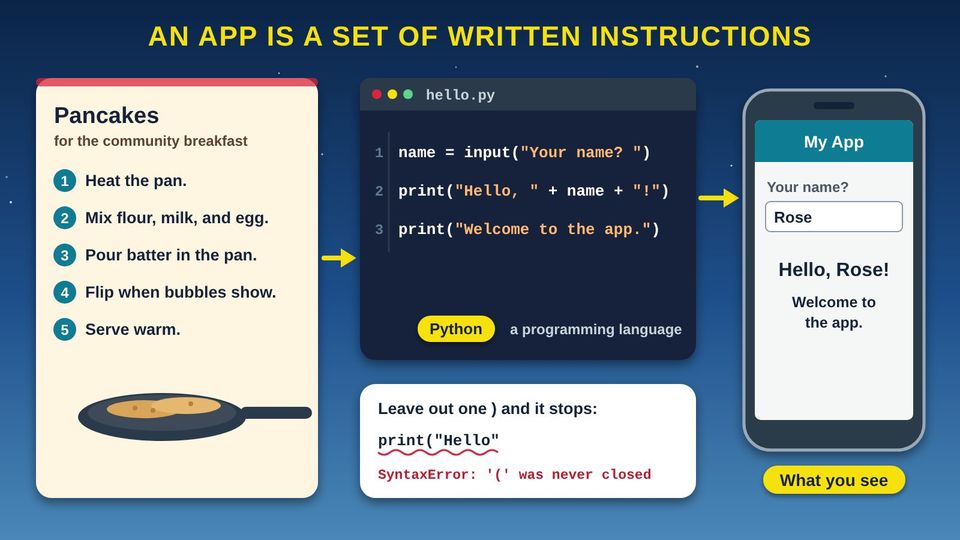
Taped above the stove at the community center is a handwritten recipe card for pancakes. Anyone who follows it, step by step, gets the same breakfast. Now picture your phone. Every app on it, from the weather to a game, started the same way: as written instructions. People wrote them in a language a computer can follow, tested them, and sent them to your phone. Think of the housing neighborhood, too, where a row of homes went up from one blueprint, each with its own paint color. In this class you will see how code is written, how a computer reads it, how a team builds an app, and why programmers use blueprints too.
Start here1How Software Development Works2Classes, Objects, and Methods3Inside a Phone AppPractice and quizWords and resources
Start hereWelcome
Listen to the story1:10
What you will learn
- Explain that an app is a set of written instructions, called source code, in a programming language
- Describe the difference between compiling code ahead of time and interpreting it line by line
- Name the six steps of the SDLC (software development life cycle) and explain why it is a loop
- Explain classes, objects, properties, and methods using a house blueprint and the homes built from it
In this class
1How Software Development WorksAn app is a set of written instructions. See how people write it, how the computer translates it, and the steps every software team follows.3 pictures2Classes, Objects, and MethodsProgrammers use blueprints, called classes, to build many objects that share the same parts and actions.1 picture3Inside a Phone AppPutting it together: what happens when you tap an app on your phone.1 picture✓Practice and quizTry it yourself, the three things to remember, and a short quiz.
Part 1How Software Development Works
An app is a set of written instructions. See how people write it, how the computer translates it, and the steps every software team follows.
Listen to this part1:33
Read all 5 details
- 1Instructions, in order. A recipe is a list of steps in a set order. Anyone who follows it the same way gets the same pancakes. An app is the same idea: a list of instructions for a computer.
- 2Source code. Instructions written for a computer are called source code, or just code. People type it, read it, and fix it, much like a recipe card. This tiny program asks your name and then greets you.
- 3A programming language. Code is written in a programming language, a language with strict rules that people and computers can both read. This example uses a language called Python. There are many others, like JavaScript, C, and C++.
- 4Computers do not guess. A cook can guess what a smudged recipe means. A computer cannot. Leave out one small mark, like a closing parenthesis, and the program stops with an error. A mistake in code is called a bug.
- 5What you see. When the code runs, you see the result on your screen. Every app on your phone, from the weather to games, is built from instructions like these, just many more of them.
Listen to this picture1:47
Read all 6 details
- 1People write source code. People write code in a programming language that they can read. A computer's chip cannot run it in that form. It has to be translated first, in one of two ways.
- 2A compiler translates it all ahead of time. Compiling means changing a program from the language it was written in into another form. A compiler is the program that does this. It translates the whole program before anyone runs it, like a book translated before it is printed.
- 3Ready to run, fast. Languages like C and C++ are compiled into machine code, the ones and zeros a computer's chip runs directly. Because the work was done ahead of time, the finished program is ready the moment you open it.
- 4An interpreter goes line by line. At a Council meeting, an interpreter listens to one sentence, then says it in the language the listeners understand, then the next sentence. Interpreted code works the same way: it is translated and run from top to bottom, one line at a time, while it runs.
- 5JavaScript arrives as text. When you visit a website, your web browser gets its JavaScript code in its original text form and runs it from top to bottom. The yellow arrow shows the line running right now.
- 6Both at once. Modern JavaScript engines also use just-in-time compiling: while the code runs, they compile parts of it into a faster form. So the line between the two ways is not as sharp as it used to be.
Listen to this picture1:42
Read all 6 details
- 1Plan. Every app starts with a question: what do people need? Say the tribal library wants an app that shows its hours and events. The team writes down what the app must do, who will use it, and how much time and money it will take.
- 2Design. Next the team sketches the screens and decides how the parts will fit together, the way a builder draws plans before pouring a foundation. Design is cheaper to change on paper than after the code is written.
- 3Build. Now programmers write the source code, following the design. Amazon Web Services calls this step Implement. Big apps are built in small pieces, and each piece is checked as it is finished.
- 4Test. Testers try the app to find bugs, the mistakes in the code. Good testing includes real people: an Elder with large text turned on, a student on an older phone, someone with a weak signal far out of town.
- 5Release. When the app passes its tests, it is shared with the people who will use it, often through an app store. Amazon Web Services calls this step Deploy. It is like opening day for a new community building.
- 6Maintain. The work is not done at release. People find new problems and ask for new features. The team fixes and improves the app and sends updates, and new ideas go back to step 1. That is why it is drawn as a loop.
Be the computer
Ask a friend to write the steps for making a sandwich. Then follow them exactly as written, nothing more. If the steps never say to open the jar, you cannot open it. Computers work the same way, and a missing step is a bug.
Compiling and interpreting side by side
| Compiled | Interpreted | |
|---|---|---|
| When it is translated | All at once, before the program runs | Line by line, from top to bottom, while it runs |
| Everyday comparison | A book translated before it is printed | A live interpreter at a Council meeting |
| What the computer gets | Machine code, ready for the chip | The code in its original text form |
| Examples | C and C++ | JavaScript in your web browser |
Modern JavaScript engines also use just-in-time compiling, which turns parts of the code into a faster form while it runs.
The six steps, with a building project for comparison
| Step | In an app | In a building project |
|---|---|---|
| 1. Plan | Decide what the app must do and who will use it | Decide what the community needs from the building |
| 2. Design | Sketch the screens and how the parts fit | Draw the blueprints |
| 3. Build (implement) | Write the source code | Pour the foundation and frame the walls |
| 4. Test | Find and fix bugs, with real people trying it | Inspect the wiring, plumbing, and roof |
| 5. Release (deploy) | Share it, often through an app store | Opening day |
| 6. Maintain | Send updates with fixes and new features | Repairs, upgrades, and new rooms |
Part 2Classes, Objects, and Methods
Programmers use blueprints, called classes, to build many objects that share the same parts and actions.
Listen to this part1:48
Read all 6 details
- 1A class is a blueprint. A class is a plan for making things. Like a housing blueprint, it describes what every house will have, but it is not a house itself. This line starts a class named House.
- 2The setup step. This special part, written __init__, runs every time a new house is made. Many languages call it a constructor. It takes the details for one house, its color and its number of rooms.
- 3Properties describe each house. self.color and self.rooms are properties: facts that describe one house. The word self means this one house. Every house has a color, but each house can have a different one.
- 4Methods are what it can do. open_door is a method: an action that every house built from the blueprint can do. When it runs, it prints a welcome that uses that house's own color.
- 5Objects are the real houses. These three lines use the blueprint to make three objects, also called instances: home1, home2, and home3. One class can make as many objects as you need, like a street of homes built from the same plan.
- 6Each object keeps its own details. home1.open_door() opens only the tan house's door, so the program prints Welcome to the tan house. The green and yellow houses are not changed. Each object keeps its own details to itself.
The code, line by line
You can type this code into a free online Python editor and run it yourself. It prints one line: Welcome to the tan house.
| Line | What it means |
|---|---|
| class House: | Start a blueprint (a class) named House. |
| def __init__(self, color, rooms): | The setup step (constructor). It runs each time a new house is made and takes that house's color and number of rooms. |
| self.color = color | Save this house's color as a property. |
| self.rooms = rooms | Save this house's number of rooms as a property. |
| def open_door(self): | Start a method named open_door, something every house can do. |
| print("Welcome to the", self.color, "house") | When the door opens, show a welcome that uses this house's own color. |
| home1 = House("tan", 3) | Build the first object (instance) from the blueprint: a tan house with 3 rooms. |
| home2 = House("green", 2) | Build a second object: a green house with 2 rooms. |
| home3 = House("yellow", 4) | Build a third object: a yellow house with 4 rooms. |
| home1.open_door() | Ask only home1 to open its door. The screen shows: Welcome to the tan house |
Indents matter in Python. The four spaces show which lines belong inside the class and inside each method.
Another example: pickup trucks
Class: the blueprint
The factory's plan for one model of pickup truck. Every truck built from it has the same parts.
Objects: the trucks
Your red truck and your uncle's white truck. Both were built from the same plan, so each is an object, or instance, of that class.
Properties: what describes it
Color, miles on the odometer, and how much fuel is in the tank. Each truck has its own values.
Methods: what it can do
Start, drive, honk, and haul. Honking your horn does not honk your uncle's.
Part 3Inside a Phone App
Putting it together: what happens when you tap an app on your phone.
Listen to this part1:27
Read all 5 details
- 1The screen you see. The buttons, words, and pictures you tap are the app's user interface (UI). Designers sketched these screens in the design step, long before you ever opened the app.
- 2Code that runs on your phone. Behind the screen, the app's code runs on your phone's chip. It decides what to show and what to do when you tap. This tiny example takes a list of events and shows them one at a time.
- 3A trip over the network. When the app needs new information, like this week's events, it sends a request over Wi-Fi or the cell network. Numu Communications builds and runs networks like this for tribal and rural communities.
- 4Data stored far away. Many apps keep their information, like event lists, accounts, and messages, on a server in a data center that may be far away. That is why some apps do not work, or show old information, without a connection.
- 5Updates from the app store. Remember the maintain step? When the team fixes a bug or adds a feature, they send new code through the app store. Installing updates gives you the fixes and keeps the app working well.
Keep your apps updated
Updates are the maintain step of the life cycle. They bring bug fixes and new features. Turn on automatic updates in your app store's settings, or check for updates once a week, so you always have the latest fixes.
ReviewPractice and quiz
Listen to the practice steps1:33
Try it at home
Twenty minutes with your own phone, tablet, or computer, and a friend for step 3. Menu names differ a little from device to device.
- Look at your app list. iPhone: swipe left past your last home screen to see the App Library. Android: swipe up from the bottom of the home screen. Count the apps you used this week.
- Find your update history. iPhone: open the App Store and tap your picture in the top right. Android: open Google Play, tap your picture, then Manage apps and device. Open one app's page and read its "What's new" note. Which step of the life cycle made that change?
- Be the computer. Ask a friend to write the steps for making a sandwich or a cup of coffee. Follow them exactly as written, nothing more. Write down every missing step. Those are bugs.
- Try a free beginner coding lesson at Code.org (code.org/learn). Pick an activity for beginners. Notice how each block or line is one instruction.
- Look around your home or the community for a class and its objects: one plan, many copies. What are their properties, and what can they do?
Remember
An app is written instructions called source code
Compilers translate ahead; interpreters translate line by line
A class is a blueprint; objects are houses
Check what you learned
1. Your niece shows you what she typed in her coding class: print("Hello"). What is she showing you?
People write instructions for a computer in a programming language. Those written instructions are called source code.
2. At a Council meeting, an interpreter says each sentence in another language right after the speaker says it. Which way of running code is this most like?
An interpreter works one line at a time, from top to bottom, while the program runs. A compiler translates the whole program before it runs, like a book translated before it is printed.
3. Before a new tribal library app goes out, five Elders try it and find the text is too small to read. Which step of the SDLC (software development life cycle) is this?
Trying the app to find problems before it is released is testing. Testing with real people catches problems the programmers might miss.
4. A housing program builds 20 homes from the same blueprint. In programming words, what are the 20 homes?
The blueprint is the class. Each home built from it is an object, also called an instance. One class can make many objects.
5. In the House class, open_door() is something every house can do. What is open_door() called?
Methods are actions an object can do. Properties, like color and rooms, describe the object.
6. Your phone says an update is ready for an app you use every day. What does the update usually bring?
Updates are the maintain step of the life cycle. The team fixes bugs and adds features, then sends the new code through the app store.
ResourcesWords and resources
Words to know
- App
- Short for application. A program, or set of instructions, that does a job on a phone, tablet, or computer.
- Source code
- The instructions for a program, written by people in a programming language. Often just called code.
- Programming language
- A language with strict rules that people use to write instructions for a computer, such as Python, JavaScript, C, or C++.
- Bug
- A mistake in code that makes a program stop or do the wrong thing.
- Compiler
- A program that translates a whole program into another form, such as machine code, before it runs.
- Interpreter
- A program that translates and runs code from top to bottom, one line at a time, while it runs.
- Machine code
- Instructions in ones and zeros that a computer's chip can run directly.
- JIT compiling
- Just-in-time compiling. Turning parts of code into a faster form while the program runs, used by modern JavaScript engines.
- SDLC
- Software development life cycle. The steps teams follow to build software: plan, design, build, test, release, and maintain.
- OOP
- Object-oriented programming. A way of writing code with classes and the objects built from them.
- Class
- A blueprint, or template, that describes what a kind of object has and can do.
- Object
- One thing built from a class, also called an instance. One class can make many objects.
- Property
- A fact that describes an object, like a house's color or number of rooms.
- Method
- An action an object can do, like a house's open_door.
- Constructor
- The setup step in a class that runs each time a new object is made. In Python it is written __init__.
- UI
- User interface. The screens, buttons, words, and pictures you see and tap in an app.
Learn more
- Code.org: LearnFree beginner coding activities for all ages, no experience needed.
- Khan Academy: ComputingFree nonprofit lessons on programming and computer science.
- MDN Web Docs: Object-oriented programmingClasses, instances, properties, and methods, with examples.
- Microsoft Learn: Objects, create instances of typesHow one class, like a blueprint, makes many objects.
- AWS: What is SDLC?The six phases of the software development life cycle, from Amazon Web Services.
For teachers and digital navigators: how to run this class (45 minutes)
Lesson plan
- 5 minStart here: read the story and the objectives.
- 15 minHow Software Development Works: pairs write sandwich steps on a card, swap, and follow them exactly. Act out compiling and interpreting, then walk the life cycle loop.
- 10 minClasses, Objects, and Methods: the blueprint and the houses. Read the code line by line, then do the pickup truck cards.
- 5 minInside a Phone App: follow an app from the screen to the server.
- 10 minPractice and quiz together, then the three Remember cards.
What you need
- Projector or large TV for the slides
- Printed handouts, one per person
- Index cards and pens for the Be the computer activity
- Optional: bread, a butter knife, and a jar of jam for a live Be the computer demonstration
- Participants' own phones, tablets, or laptops
- Optional: one computer with internet to run the House code in a free online Python editor
Talk about it
- Which app do you use most? What do you think is stored on your phone, and what is stored on a server far away?
- Who should test an app made for our community before it is released?
- What kind of app would help our community? Walk it through the six steps of the life cycle.
The PowerPoint slides follow this plan, with the story and every picture detail in the speaker notes.
References
- Amazon Web Services. (n.d.). What is SDLC? https://aws.amazon.com/what-is/sdlc/
- MDN contributors. (n.d.-a). Compile. MDN Web Docs. https://developer.mozilla.org/en-US/docs/Glossary/Compile
- MDN contributors. (n.d.-b). Object-oriented programming. MDN Web Docs. https://developer.mozilla.org/en-US/docs/Learn_web_development/Extensions/Advanced_JavaScript_objects/Object-oriented_programming
- MDN contributors. (n.d.-c). What is JavaScript? MDN Web Docs. https://developer.mozilla.org/en-US/docs/Learn_web_development/Core/Scripting/What_is_JavaScript
- Microsoft. (n.d.). Objects: Create instances of types. Microsoft Learn. https://learn.microsoft.com/en-us/dotnet/csharp/fundamentals/object-oriented/objects
- Oracle. (n.d.). What is a class? The Java Tutorials. https://docs.oracle.com/javase/tutorial/java/concepts/class.html
Questions about internet service for your community?
Our team is happy to help guide your community's broadband plan.
Contact our team