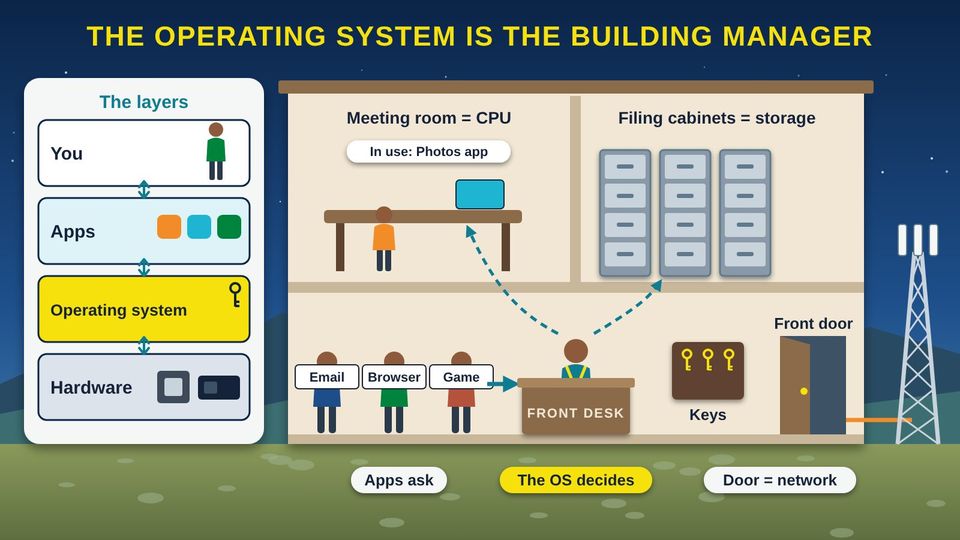
Think about the tribal administration building on a busy Monday. Programs need the meeting room, staff need records from the filing cabinets, and visitors come and go through the front door. One person keeps it all running: the building manager. The manager books the meeting room so groups take turns, knows which drawer holds each record, and keeps the keys. Nobody walks into a locked office without the manager saying yes. Your computer and phone have a manager like this too. It is called the operating system, and this class shows you what it does, where it came from, and how to keep it up to date.
Start here1What an Operating System Does2Windows, UNIX, and Linux3Phones and Tablets4Updates and End of SupportPractice and quizWords and resources
Start hereWelcome
Listen to the story1:09
What you will learn
- Explain what an operating system (OS) does for your apps, your files, and your safety
- Tell how Windows, UNIX, and Linux differ, and how macOS, ChromeOS, Android, iOS, and iPadOS fit in the family tree
- Find which operating system and version your phone and computer run
- Turn on automatic updates and know what it means when support for a system ends
In this class
1What an Operating System DoesThe operating system is the building manager between you, your apps, and the hardware.1 picture2Windows, UNIX, and LinuxWhere each one came from, who makes it, where you meet it, and how they differ.2 pictures3Phones and TabletsAndroid and iOS run almost every phone, and both grew from the same families.1 picture4Updates and End of SupportWhy updates matter, and what to do when a system stops getting them.1 picture✓Practice and quizTry it yourself, the three things to remember, and a short quiz.
Part 1What an Operating System Does
The operating system is the building manager between you, your apps, and the hardware.
Listen to this part2:00
Read all 6 details
- 1Layers: you, apps, the OS, hardware. Think of your device in layers. You use apps. Apps ask the operating system (OS) for what they need. The OS works the hardware, the parts inside the box. The OS sits in the middle, so apps do not have to know every part.
- 2The manager. The National Institute of Standards and Technology (NIST) calls an OS the software that manages the hardware and gives programs common services. It is the first program to load when you turn the device on, and it runs everything after that, like a building manager.
- 3Apps ask first. An app, also called a program, cannot grab the processor, files, or internet on its own. It asks the operating system, like a visitor checking in at the front desk. The OS takes turns so every app gets what it needs.
- 4Meeting room: the processor. The CPU (Central Processing Unit) is the meeting room where work gets done. The OS books it in tiny time slots, switching between apps so fast that they all seem to run at once.
- 5Filing cabinets: storage and files. The OS keeps track of every file and folder in storage, like a building manager who knows which drawer holds each record. When you save a photo, the OS picks where it goes and remembers it.
- 6Keys and the front door. The OS keeps the keys. It checks your password or fingerprint, gives each person in the house their own account, and decides which apps may go out the front door to the internet, the network.
The manager's five jobs
Runs the hardware
Turns on the parts inside and gives each app a turn on the CPU (Central Processing Unit) and memory.
Runs your apps
Starts, stops, and switches between the apps you open.
Keeps your files
Knows where every photo, document, and folder is stored.
Guards the door
Checks passwords, keeps each person's account separate, and controls who reaches the network.
Gets updates
Brings in fixes from the maker to close security holes and repair problems.
Part 2Windows, UNIX, and Linux
Where each one came from, who makes it, where you meet it, and how they differ.
Listen to this part1:54
Read all 5 details
- 1UNIX: the old root. UNIX was written in 1969 at AT&T Bell Labs by Kenneth Thompson and Dennis Ritchie, on a spare minicomputer. Many of today's systems grew from it or borrowed its ideas.
- 2Apple's branch. Apple's macOS, the system on Mac computers, is certified as UNIX by The Open Group. Apple also makes iOS for the iPhone. In 2019 Apple announced iPadOS for the iPad, built on the same foundation as iOS.
- 3Linux: a new tree from UNIX ideas. In 1991, a student in Finland named Linus Torvalds began writing a free operating system, Linux. The Linux part is the kernel, the core that talks to the hardware. A distribution wraps the kernel with apps and tools into a complete Linux system.
- 4Linux branches out. Android phones run on a kernel based on Linux. Many web servers that send you websites run Linux too. Google also makes ChromeOS for Chromebooks, and in 2026 announced Googlebook OS, which brings together ChromeOS and Android technology.
- 5Windows: its own family. Microsoft announced Windows in 1983, and Windows 1.0 came out in 1985. It is a separate family, not built from UNIX. Windows 11 came out in 2021. Windows 10 support ended on October 14, 2025, so that branch no longer grows.
Listen to this picture1:36
Read all 5 details
- 1Windows. Microsoft makes Windows. You find it on most home, school, and office PCs (personal computers), made by many different brands. The cost of Windows is usually part of the price of the computer. Updates come through Windows Update in Settings.
- 2macOS. Apple makes macOS, and it comes on Apple's Mac computers. Apple makes both the computer and the operating system. Updates come through Software Update in System Settings.
- 3Linux. Linux is free to download and use. Many groups, from volunteers to companies, put together their own distributions, which are complete Linux systems. It runs many web servers and some home and office computers.
- 4ChromeOS. Google makes ChromeOS for Chromebooks, laptops made by many brands and common in schools. Most of the work happens in the web browser. Google says today's Chromebooks will keep getting updates through mid-2034.
- 5Who uses what. StatCounter's worldwide numbers for September 2026 give Windows about 76% of desktop and laptop use. Apple Mac computers have about 17% (StatCounter lists them under two names, OS X and macOS), Linux about 4.5%, and ChromeOS about 2.3%.
Windows, UNIX, and Linux at a glance
| Windows | UNIX (and macOS) | Linux | |
|---|---|---|---|
| Started | Announced 1983, first released 1985 | 1969, at AT&T Bell Labs | 1991, by Linus Torvalds in Finland |
| Who makes it | Microsoft | UNIX began at Bell Labs; today Apple's macOS is a certified UNIX | Volunteers and companies; many groups make their own distributions |
| Cost in general | Usually part of the price of a new PC (personal computer) | macOS comes with Apple's Mac computers | Free to download and use |
| Where you meet it | Most home, school, and office PCs | Mac computers | Many web servers, Android phones (its kernel), and some PCs |
Part 3Phones and Tablets
Android and iOS run almost every phone, and both grew from the same families.
Listen to this part1:43
Read all 5 details
- 1Android. Google makes Android, and many brands sell phones and tablets that run it. Android is built on a kernel based on Linux. Because each brand adds its own touches, menus can look a little different from phone to phone.
- 2iOS on iPhone. Apple makes iOS, and it runs only on Apple's iPhone. Apple makes both the phone and the operating system, so updates come straight from Apple.
- 3iPadOS on iPad. In 2019 Apple announced iPadOS for the iPad. Apple says it is built on the same foundation as iOS, with extra features for the bigger screen. If you know an iPhone, an iPad will feel familiar.
- 4About 7 in 10 phones are Android. StatCounter's worldwide numbers for September 2026 show Android at 69.17% of mobile use and iOS at 30.81%. In the picture, each small square stands for 1%: about 69 squares for Android and 31 for iOS.
- 5Find your updates. On an Android phone, open Settings and look for Software update, often under System. On an iPhone or iPad, open Settings, then General, then Software Update. Turn on automatic updates while you are there.
Part 4Updates and End of Support
Why updates matter, and what to do when a system stops getting them.
Listen to this part1:39
Read all 5 details
- 1What an update does. An update is the maker sending a fix. Most updates close security holes that thieves could use, fix problems, or add new features. It is like the building manager putting a stronger lock on a window.
- 2Turn on automatic updates. The Cybersecurity and Infrastructure Security Agency (CISA) says to turn on automatic updates. Then fixes arrive on their own, often overnight. Keep the device plugged in and restart it when it asks.
- 3End of support. Every operating system version has an end date. Microsoft ended support for Windows 10 on October 14, 2025. After that date, the maker stops sending fixes, even though the computer still turns on.
- 4Why it matters. Without updates, new security holes stay open, like a broken window nobody comes to fix. The longer a system goes without fixes, the more open holes it has.
- 5Plan your move. Check what version you run and when its support ends. The newest Windows is Windows 11, version 26H2, released on September 29, 2026. Google says today's Chromebooks get updates through mid-2034. Plan an upgrade or a new device before your date arrives.
Still on Windows 10?
Microsoft ended support for Windows 10 on October 14, 2025. The computer still turns on, but Microsoft no longer sends it fixes. Check Settings, then System, then About. If it says Windows 10, ask a trusted helper about moving to Windows 11 or to a newer device, and move your important files and passwords first.
ReviewPractice and quiz
Listen to the practice steps1:41
Try it at home
Fifteen minutes with your own phone and computer. Menu names differ a little from device to device.
- Find your phone's system. iPhone: Settings, then General, then About, and look for iOS Version. Android: Settings, then About phone, and look for Android version (sometimes under Software information).
- Find your computer's system. Windows: Settings, then System, then About, and look under Windows specifications for Edition and Version. Mac: the Apple menu, then About This Mac. Chromebook: Settings, then About ChromeOS.
- Write down each name and version number. If your computer says Windows 10, its support ended on October 14, 2025, so make a plan to move.
- Turn on automatic updates. iPhone or iPad: Settings, then General, then Software Update, then Automatic Updates. Android: Settings, then Software update (often under System). Windows: Settings, then Windows Update. Mac: System Settings, then General, then Software Update.
- Install any update that is waiting. Plug the device in first, and let it restart when it asks.
- Open your app store and update your apps too. They get security fixes just like the operating system.
Remember
The OS is the manager between apps and hardware
UNIX, Linux, and Windows are different families
Turn on automatic updates; know your end date
Check what you learned
1. Your granddaughter has a game, a web browser, and a photo app open on the family laptop. What decides which app gets to use the processor next?
The operating system (OS) is the manager. It gives each app a turn on the CPU (Central Processing Unit), so they all seem to run at once. The router and browser do not run other apps.
2. Your aunt's laptop runs Windows 10. It still turns on and works fine. What is the real risk?
Microsoft ended Windows 10 support on October 14, 2025. The laptop keeps working, but no more fixes arrive, so new security holes are never closed.
3. The youth center is buying phones from three different brands, none of them Apple. Which operating system will those phones most likely run?
Many brands make Android phones. iOS runs only on Apple's iPhone, and macOS only on Apple's Mac computers.
4. You are typing a letter when your computer says an update is ready. What is the best choice?
Updates close security holes. The Cybersecurity and Infrastructure Security Agency (CISA) says to turn on automatic updates. Saving first keeps your letter safe while the computer restarts.
5. Your cousin wants a free operating system she can download for a computer she built herself. Which one fits?
Linux is free to download and use, and many groups package it as a complete system called a distribution. macOS comes on Apple's Mac computers, and iOS runs on the iPhone.
ResourcesWords and resources
Words to know
- Operating system (OS)
- Operating system. The main software that manages a device's hardware, runs apps, keeps files, and guards security. It is the first program to load when you turn the device on.
- App
- Short for application. A program that does one job for you, like email, photos, or a web browser. Apps ask the operating system for what they need.
- Hardware
- The physical parts of a device you could touch, like the processor, memory, storage, screen, and radios.
- Kernel
- The core of an operating system. It talks directly to the hardware and decides which app gets the processor and memory.
- UNIX
- An operating system written in 1969 at AT&T Bell Labs. Many later systems grew from it or borrowed its ideas, and Apple's macOS is a certified UNIX.
- Linux
- A free operating system kernel started by Linus Torvalds in 1991. It runs many web servers, and Android's kernel is based on it.
- Distribution
- A complete Linux system: the Linux kernel plus the apps, tools, and settings that make it ready to use.
- Windows
- Microsoft's operating system for personal computers, first released in 1985. The current version is Windows 11.
- macOS
- Apple's operating system for Mac computers. It is certified as UNIX.
- ChromeOS
- Google's operating system for Chromebook laptops, where most work happens in the web browser.
- Android
- Google's operating system for phones and tablets, sold by many brands. Its kernel is based on Linux.
- iOS
- Apple's operating system for the iPhone.
- iPadOS
- Apple's operating system for the iPad, announced in 2019 and built on the same foundation as iOS.
- Software update
- A fix or improvement sent by the maker. Most updates close security holes, repair problems, or add features.
- End of support
- The date a maker stops sending updates for a version of its software. The device still works, but no new fixes arrive.
- CISA
- Cybersecurity and Infrastructure Security Agency. The United States government agency that helps people and organizations stay safe online.
Learn more
- CISA: Update softwareWhy updates matter and how to turn on automatic updates.
- Microsoft: Windows 10 support has endedWhat the end of Windows 10 support means and what you can do.
- Microsoft: Windows 11 release informationEvery Windows 11 version and its release date.
- Google: Googlebook OS and ChromeOS updatesHow long today's Chromebooks will keep getting updates.
- Computer History Museum: The earliest UNIX codeThe story of how UNIX began at Bell Labs in 1969.
- Linux Foundation: It's not just the Linux operating systemHow Linux started in 1991 and where it is used today.
For teachers and digital navigators: how to run this class (45 minutes)
Lesson plan
- 5 minOpen with the building manager story. Ask: who keeps our administration building running, and what would happen without them?
- 10 minPart 1: act it out. One volunteer is the manager with the keys. Three volunteers are apps holding signs (Email, Browser, Game) who must ask the manager before using the meeting room, the files, or the front door.
- 10 minPart 2: walk through the family tree and the side-by-side picture. Ask people which systems they have seen at home, school, work, or the clinic.
- 5 minPart 3: the phone picture. Have everyone hold up their phone: who has Android and who has an iPhone?
- 10 minPart 4 and Try it at home: everyone finds their system and version and turns on automatic updates. Pair people up so they can help each other.
- 5 minQuiz together with a show of hands, then the three Remember cards.
What you need
- Projector or large TV for the slides
- Printed handouts, one per person
- Props for the building manager game: a ring of keys, a few folders, and paper signs that say Meeting room, Filing cabinet, and Front door
- Participants' own phones, tablets, or laptops, charged
- Optional: one Windows laptop, one Chromebook, and one Mac or iPad to pass around
Talk about it
- Which operating systems do you use in a normal week, at home, at work, at school, or at the clinic?
- Has an update ever surprised you or got in your way? How could you plan for updates instead?
- Who in our community might still be using an old computer that no longer gets updates, and how could we help them?
The PowerPoint slides follow this plan, with the story and every picture detail in the speaker notes.
References
- Android Open Source Project. (n.d.). Kernel overview. https://source.android.com/docs/core/architecture/kernel
- Apple. (2019, June 3). The new iPadOS powers unique experiences designed for iPad [Press release]. https://www.apple.com/newsroom/2019/06/the-new-ipados-powers-unique-experiences-designed-for-ipad/
- Brock, D. C. (2019, October 17). The earliest Unix code: An anniversary source code release. Computer History Museum. https://computerhistory.org/blog/the-earliest-unix-code-an-anniversary-source-code-release/
- Computer History Museum. (n.d.-a). 1969 timeline of computer history. https://www.computerhistory.org/timeline/1969/
- Computer History Museum. (n.d.-b). What happened on November 10th. This Day in History. https://www.computerhistory.org/tdih/November/10/
- Cybersecurity and Infrastructure Security Agency. (n.d.). Update software. https://www.cisa.gov/secure-our-world/update-software
- Google. (2026). Googlebook OS and ChromeOS updates. Google Chrome Enterprise Help. https://support.google.com/chrome/a/answer/16634428?hl=en
- Microsoft. (2025). Windows 10 support has ended on October 14, 2025. Microsoft Support. https://support.microsoft.com/en-us/windows/deployment/updates-lifecycle/windows-10-support-has-ended-on-october-14-2025
- Microsoft. (2026). Windows 11 release information. Microsoft Learn. https://learn.microsoft.com/en-us/windows/release-health/windows11-release-information
- National Institute of Standards and Technology. (n.d.). Operating system. CSRC Glossary. https://csrc.nist.gov/glossary/term/operating_system
- Perlow, J. (2020, March 2). The Linux Foundation: It's not just the Linux operating system. Linux Foundation. https://www.linuxfoundation.org/blog/blog/the-linux-foundation-its-not-just-the-linux-operating-system
- StatCounter. (2026a). Desktop operating system market share worldwide. https://gs.statcounter.com/os-market-share/desktop/worldwide
- StatCounter. (2026b). Mobile operating system market share worldwide. https://gs.statcounter.com/os-market-share/mobile/worldwide
- The Linux Kernel Organization. (n.d.). About Linux kernel. The Linux Kernel Archives. https://www.kernel.org/linux.html
- The Open Group. (2025). Open Brand register: macOS version 26.0 Tahoe. https://www.opengroup.org/openbrand/register/brand3725.htm
Questions about internet service for your community?
Our team is happy to help guide your community's broadband plan.
Contact our team