Picture a clear night in the valley. Across the way, your aunt's porch light is on. Everyone in the family knows what that means: supper is ready, come on over. When the light is off, it means not tonight. One light can only say two things. With two porch lights, the family could say four different things, and with three lights, eight. Computers talk the same way. Inside every phone and computer are tiny switches, and each one is either on or off. Line up enough of them, and they can stand for any number, any letter, a photo, or a song. This class shows how, one picture at a time.
Start hereWelcome
Listen to the story1:19
What you will learn
- Explain how computers store everything as bits, 0s and 1s, and why 8 bits (one byte) make 256 patterns
- Count in binary using place values, and turn a number like 65 into 01000001
- Describe how ASCII (American Standard Code for Information Interchange) and Unicode give every letter, mark, and emoji a number
- Explain kilobytes, megabytes, and gigabytes, and why a 64 GB (gigabyte) phone can show a little less space
In this class
1BinaryComputers store everything as switches that are on or off, written as 1 and 0. Counting with only two digits is called binary.2 pictures2Bits and BytesOne switch is a bit. Eight bits make a byte. Then the bytes add up: kilobytes, megabytes, and gigabytes.1 picture3Character MappingEvery letter, number, and emoji has its own number. That shared map is why a text looks the same on every phone.2 pictures✓Practice and quizTry it yourself, the three things to remember, and a short quiz.
Part 1Binary
Computers store everything as switches that are on or off, written as 1 and 0. Counting with only two digits is called binary.
Listen to this part1:42
Read all 5 details
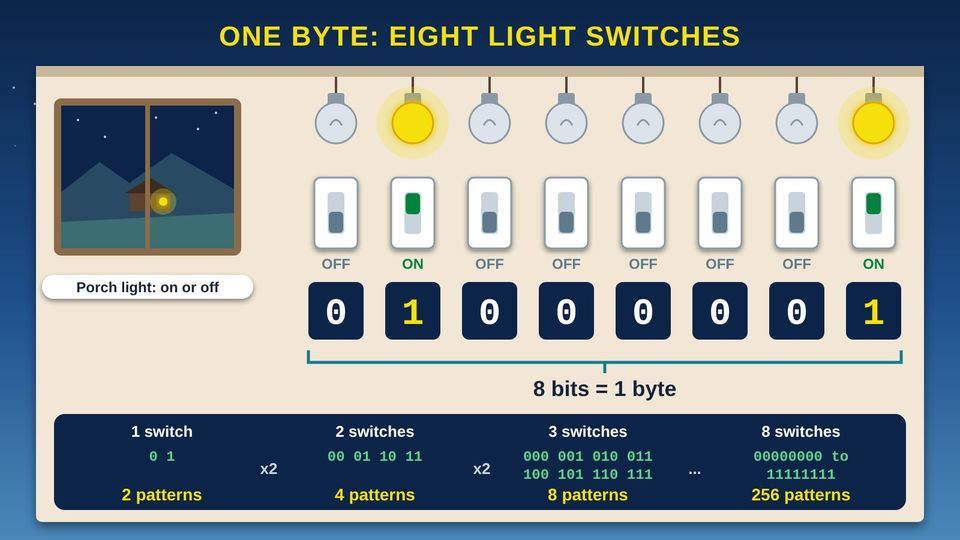
- 1One light, two messages. A porch light is either on or off, so it can send two messages across the valley: come on over, or not tonight. Computers are built from tiny switches that work the same way.
- 2A bit is one switch. Each switch is one bit. NIST (the National Institute of Standards and Technology) defines a bit as a binary digit: 0 or 1. Binary means there are only two choices.
- 3On is 1, off is 0. When a switch is on, we write 1. When it is off, we write 0. The switches inside a computer are far too small to see, but the idea is the same.
- 4Eight bits make a byte. NIST (the National Institute of Standards and Technology) defines a byte as a sequence of eight bits. This row of eight switches is one byte. Its pattern, 01000001, stands for the capital letter A. The next two pictures show why.
- 5More switches, more patterns. Each switch you add doubles the number of patterns. One switch makes 2, two make 4, and three make 8. Eight switches, one byte, make 256 different patterns, from 00000000 to 11111111.
Listen to this picture1:31
Read all 5 details
- 1Place values. Each switch has a place value. Starting at the right, the places are worth 1, 2, 4, 8, 16, 32, 64, and 128. Each place is worth 2 times the place to its right. It works like the ones, tens, and hundreds places you learned in school, but with twos.
- 2Lit lamps count. To read a byte, add up the place values of the lamps that are on. Lamps that are off count as nothing.
- 3The bits. Here only the 64 lamp and the 1 lamp are on, so the bits read 01000001, the same pattern as the light switches in the last picture.
- 464 + 1 = 65. 64 plus 1 is 65, so the pattern 01000001 means the number 65. In the next picture you will see that 65 stands for the capital letter A.
- 5Counting up. Binary counting works like a car's odometer with only 0 and 1 on each wheel. After 1 comes 10, which means 2. With all eight lamps on, 11111111 means 255, the biggest number one byte can hold. 0 to 255 makes 256 patterns.
Turn any number from 0 to 255 into bits
Use the place values 128, 64, 32, 16, 8, 4, 2, 1. Here is the number 65 as an example.
- 1Start at the left, with 128
Is your number at least 128? 65 is not, so write 0.
- 2Move to 64
65 is at least 64, so write 1 and take 64 away. That leaves 1.
- 3Keep going to the right
1 is smaller than 32, 16, 8, 4, and 2, so write 0 under each of them.
- 4Finish at 1
You have 1 left, so write 1. Your bits read 01000001.
- 5Check your work
Add the place values that have a 1 under them: 64 + 1 = 65.
Part 2Bits and Bytes
One switch is a bit. Eight bits make a byte. Then the bytes add up: kilobytes, megabytes, and gigabytes.
Listen to this part2:16
Read all 6 details
- 1One text message. In UTF-8 (Unicode Transformation Format, 8-bit), each plain English letter, space, or period takes 1 byte. So a text with 160 characters takes 160 bytes. That is 1,280 bits, because each byte is 8 bits.
- 2Kilobyte. A KB (kilobyte) is 1,000 bytes. Kilo means 1,000, the same as in kilometer. One kilobyte holds about 6 of those 160-character texts.
- 3Megabyte. An MB (megabyte) is 1,000 kilobytes, or 1,000,000 bytes. That is room for 6,250 of those texts.
- 4Gigabyte. A GB (gigabyte) is 1,000 megabytes, or 1,000,000,000 bytes. That is room for 6,250,000 of those texts. Each step up is 1,000 times bigger than the last.
- 5Why a 64 GB phone shows a little less. The box counts by 1,000s, so 64 GB (gigabytes) means 64,000,000,000 bytes. Some devices count by 1,024s instead. Counted that way, the same space comes to about 59.6 GiB (gibibytes), which some devices show as 59.6 GB. Part of the space also holds the phone's own software.
- 6Kibibytes. NIST (the National Institute of Standards and Technology) lists separate names for counting by 1,024s: a KiB (kibibyte) is 1,024 bytes, a MiB (mebibyte) is 1,024 KiB, and a GiB (gibibyte) is 1,024 MiB. The IEC (International Electrotechnical Commission) approved these names in December 1998.
Two ways to count bytes
The units on the box count by 1,000s. Their cousins with an i in the short name count by 1,024s.
| Unit | Bytes |
|---|---|
| 1 KB (kilobyte) | 1,000 |
| 1 KiB (kibibyte) | 1,024 |
| 1 MB (megabyte) | 1,000,000 |
| 1 MiB (mebibyte) | 1,048,576 |
| 1 GB (gigabyte) | 1,000,000,000 |
| 1 GiB (gibibyte) | 1,073,741,824 |
The names that count by 1,024s were approved by the IEC (International Electrotechnical Commission) in December 1998. NIST (the National Institute of Standards and Technology) notes they are not part of the SI (International System of Units), the metric system.
Part 3Character Mapping
Every letter, number, and emoji has its own number. That shared map is why a text looks the same on every phone.
Listen to this part1:38
Read all 5 details
- 1You press a key. When you type your name, the keyboard tells the computer which key you pressed. Here someone types a capital A using the Shift key, then n, then a.
- 2The character map. The computer looks up each character in a character map, a list that gives every character a number. An older map called ASCII (American Standard Code for Information Interchange) uses 7 bits to hold 128 characters: English letters, digits, spaces, and marks like the period.
- 3Capital and small letters. A capital A and a small a are different characters, so they get different numbers: A is 65 and a is 97. Each small letter's number is 32 more than its capital.
- 4Numbers become bits. Each number is stored as one byte of bits. 65 is 01000001, 110 is 01101110, and 97 is 01100001. A three-letter name takes three bytes.
- 5Reading it back. To show your name, the computer works the other way. It reads the bits, turns them into numbers, looks up each number in the map, and draws the letters on the screen.
Listen to this picture2:04
Read all 6 details
- 1Every character gets a number. Unicode is a huge character map that computers and phones around the world share. The Unicode Consortium says Unicode provides a unique number for every character. It keeps the old ASCII (American Standard Code for Information Interchange) numbers, so A is still 65.
- 2Numbers travel, letters arrive. Your phone sends the numbers, not the shapes of the letters. Because both phones use the same Unicode numbers, the message arrives looking the same, even on a different brand of phone.
- 3Every writing system. Unicode gives numbers to the letters and marks of writing systems around the world, like Greek, Cyrillic, and Chinese. A letter with a mark has a Unicode number too, so words written with special letters can travel from phone to phone.
- 4Emoji are characters too. Emoji, the small pictures in texts, are encoded in Unicode with their own numbers. The grinning face is number 128,512. Once an emoji is added, Unicode says it will never be removed.
- 5UTF-8: storing the numbers. UTF-8 (Unicode Transformation Format, 8-bit) is the most common way to store text on the web. Each character takes 1 to 4 bytes. Its first 128 characters match ASCII (American Standard Code for Information Interchange) exactly, so plain English text takes 1 byte per letter.
- 6Still growing. Unicode keeps adding characters. Version 18.0, released September 16, 2026, added 13,007 characters for a total of 172,808, including nine new emoji.
Character map for capital letters
Use this chart for the activity below. For a small letter, add 32: a is 97, b is 98, and so on up to z, which is 122.
| Letter | Number | Bits |
|---|---|---|
| A | 65 | 01000001 |
| B | 66 | 01000010 |
| C | 67 | 01000011 |
| D | 68 | 01000100 |
| E | 69 | 01000101 |
| F | 70 | 01000110 |
| G | 71 | 01000111 |
| H | 72 | 01001000 |
| I | 73 | 01001001 |
| J | 74 | 01001010 |
| K | 75 | 01001011 |
| L | 76 | 01001100 |
| M | 77 | 01001101 |
| N | 78 | 01001110 |
| O | 79 | 01001111 |
| P | 80 | 01010000 |
| Q | 81 | 01010001 |
| R | 82 | 01010010 |
| S | 83 | 01010011 |
| T | 84 | 01010100 |
| U | 85 | 01010101 |
| V | 86 | 01010110 |
| W | 87 | 01010111 |
| X | 88 | 01011000 |
| Y | 89 | 01011001 |
| Z | 90 | 01011010 |
Why a text can look the same on every phone
Phones send numbers, not the shapes of letters. Because phones and computers share the same Unicode numbers, a letter with a mark, a word in another writing system, or an emoji arrives as the same character on the other end.
ReviewPractice and quiz
Listen to the practice steps1:43
Try it at home
Fifteen minutes with paper, a pencil, your hands, and your phone.
- Copy the place values across the top of a sheet of paper: 128, 64, 32, 16, 8, 4, 2, 1.
- Write your initials in binary. Find each letter's number in the character map chart above, then use the steps under Part 1 to turn it into eight bits. Check your work by adding up the place values with a 1 under them.
- Count to 10 on your fingers in binary. Hold up one hand closed in a fist. Your thumb is worth 1, your pointer finger 2, your middle finger 4, your ring finger 8, and your little finger 16. Raise the fingers that add up to each number: 1 is the thumb, 2 is the pointer, 3 is both, and so on up to 10, which is the pointer and ring fingers.
- Find your phone's storage. iPhone: Settings, then General, then iPhone Storage. Android: Settings, then Storage. Write down the total it shows.
- Compare that total to the storage size printed on the box, the receipt, or the store page. Is it a little less? Think about the two reasons from the last picture.
- Send a family member a text with a letter that has a mark, like the e in cafe with an accent, and an emoji. Ask them if it arrived looking the same.
Remember
Computers store everything as bits: 0 or 1
Eight bits make a byte: 256 patterns
Unicode gives every character a number
Check what you learned
1. Your class at the community center uses a row of 8 light switches as one byte. How many different on and off patterns can the row make?
Each switch you add doubles the patterns: 2, 4, 8, 16, 32, 64, 128, 256. One byte, 8 bits, makes 256 patterns.
2. On your binary chart, the lamps under 8, 2, and 1 are on and the rest are off. What number does that byte stand for?
Add the place values of the lamps that are on: 8 + 2 + 1 = 11. The byte reads 00001011.
3. Your cousin texts you a word with an accented letter and a grinning face emoji from a different brand of phone. Why does it look the same on your phone?
Phones send numbers, not shapes. Unicode gives every character, including emoji, its own number, so both phones show the same character.
4. You write a 160-character text using only plain English letters, spaces, and periods. How much space does it take in UTF-8 (Unicode Transformation Format, 8-bit)?
In UTF-8, each plain English character takes 1 byte, so 160 characters take 160 bytes. A kilobyte is 1,000 bytes, so the text is much smaller than one KB.
5. Your new phone's box says 64 GB (gigabytes), but Settings shows a little less. What is the most likely reason?
The box counts by 1,000s: 64,000,000,000 bytes. Counted by 1,024s, that is about 59.6 gibibytes (GiB), and the phone's own software is stored there too.
ResourcesWords and resources
Words to know
- Bit
- Binary digit. The smallest piece of computer data: a 0 or a 1, like one switch that is off or on.
- Byte
- A group of eight bits. One byte can make 256 different patterns, enough for one plain English letter.
- Binary
- A way of counting with only two digits, 0 and 1. Each place is worth 2 times the place to its right.
- Place value
- What a digit is worth because of where it sits. In a byte, the places are worth 128, 64, 32, 16, 8, 4, 2, and 1.
- Character
- One letter, digit, space, punctuation mark, or emoji.
- Character map
- A list that gives every character a number, so a computer can store letters as numbers and bits. Also called a character set or encoding.
- ASCII
- American Standard Code for Information Interchange. An older character map that uses 7 bits for 128 characters. The capital letter A is 65.
- Unicode
- A worldwide character map that gives a unique number to every character, in every writing system, including emoji.
- UTF-8
- Unicode Transformation Format, 8-bit. The most common way to store text on the web. Each character takes 1 to 4 bytes, and plain ASCII text is already UTF-8.
- Emoji
- Small pictures used in texts, like a grinning face. Each one is a character with its own Unicode number.
- KB
- Kilobyte. 1,000 bytes.
- MB
- Megabyte. 1,000,000 bytes, or 1,000 kilobytes.
- GB
- Gigabyte. 1,000,000,000 bytes, or 1,000 megabytes.
- KiB, MiB, GiB
- Kibibyte, mebibyte, and gibibyte. Units that count by 1,024s: 1 KiB is 1,024 bytes, 1 MiB is 1,048,576 bytes, and 1 GiB is 1,073,741,824 bytes.
Learn more
- Code.org: How Computers Work and How the Internet Works videosShort, friendly videos, including one on binary and data.
- Khan Academy: Computers and the InternetFree lessons on how computers store information as bits.
- Unicode Consortium: What is Unicode?The group that keeps the Unicode character map explains what it does.
- MDN Web Docs: UTF-8A short definition of UTF-8, the most common way to store text on the web.
- NIST (National Institute of Standards and Technology): Prefixes for binary multiplesThe official names for counting by 1,000s and by 1,024s.
For teachers and digital navigators: how to run this class (45 minutes)
Lesson plan
- 5 minStart here: read the story and the objectives.
- 10 minBinary: eight volunteers stand in a row holding plates. Flip plates to show 01000001 and add up 64 + 1 together.
- 8 minBits and Bytes: how big is a byte. Find phone storage in Settings and compare it to the box or receipt.
- 12 minCharacter Mapping: everyone writes their initials in binary using the chart, then a partner checks the math.
- 10 minPractice and quiz together, then the three Remember cards.
What you need
- Projector or large TV for the pictures
- Printed handouts with the place value chart and character map, one per person
- Paper and pencils
- Eight paper plates or large cards, yellow on one side for on and gray on the other for off
- Participants' own phones, and the phone box or receipt if they have it
Talk about it
- Before everyone had a cell phone, how did families here send simple signals, like come home for supper?
- Have you ever gotten a text where a letter or emoji showed up as a box or a question mark? What do you think happened?
- What would you want to keep on a phone: photos, videos, or recordings of family stories? How much space do you think you would need?
The PowerPoint slides follow this plan, with the story and every picture detail in the speaker notes.
References
- MDN contributors. (n.d.-a). ASCII. MDN Web Docs. https://developer.mozilla.org/en-US/docs/Glossary/ASCII
- MDN contributors. (n.d.-b). UTF-8. MDN Web Docs. https://developer.mozilla.org/en-US/docs/Glossary/UTF-8
- National Institute of Standards and Technology. (n.d.-a). Bit. CSRC Glossary. https://csrc.nist.gov/glossary/term/bit
- National Institute of Standards and Technology. (n.d.-b). Byte. CSRC Glossary. https://csrc.nist.gov/glossary/term/byte
- National Institute of Standards and Technology. (n.d.-c). Prefixes for binary multiples. https://physics.nist.gov/cuu/Units/binary.html
- Unicode Consortium. (n.d.-a). C0 controls and basic Latin [Code chart]. https://www.unicode.org/charts/PDF/U0000.pdf
- Unicode Consortium. (n.d.-b). Emoji and dingbats FAQ. https://www.unicode.org/faq/emoji_dingbats.html
- Unicode Consortium. (n.d.-c). What is Unicode? https://www.unicode.org/standard/WhatIsUnicode.html
- Unicode Consortium. (2026, September 16). Announcing the Unicode Standard, version 18.0. https://blog.unicode.org/2026/09/announcing-unicode-standard-version-180.html
Questions about internet service for your community?
Our team is happy to help guide your community's broadband plan.
Contact our team