When the tribe buys a new truck for the road crew, leaders ask hard questions. What will it really cost, with fuel and repairs? Who will drive it, and are they trained? Will it do the job we need? AI (artificial intelligence) deserves the same questions, and a few more, because it touches our information, our people, and our decisions. This guide gives Council members and leaders a way to lead: our data stays our decision, every tool has guards, the Council has a clear role, and we start small. New to AI? Start with our community class, AI for Everyone: What It Is and How to Use It Safely, then come back to this guide.
Start here1Our Data, Our Decision2Risks and Our Guards3The Council's Role4Leading the Change5Planning Our Path and Guiding StaffPractice and quizProgram tools and resources
Start hereWelcome
Listen to the story1:21
What you will learn
- Explain data sovereignty, and sort your Nation's information into five places that decide what AI (artificial intelligence) may touch
- Name the main AI risks, including automation bias and prompt injection, and the guards that keep a human in the loop
- Use four risk levels and six gates to decide which AI uses come to the Council, and what to see before you approve
- Lead the change: put people first, count the full cost, question vendors, and plan a small, safe start with trained staff
In this guide
1Our Data, Our DecisionInformation about our people, lands, programs, and culture starts with us, like our water. Where information lives decides what AI may touch.3 pictures2Risks and Our GuardsAI can be wrong, people can trust it too much, and hidden words can trick it. The answer is not one rule but a set of guards, with a trained person in the loop.4 pictures3The Council's RoleLike fire danger signs, AI uses have levels. Low-risk tools move quickly. High-risk uses pass through every gate and come to the Council. AI may help write the staff report, but the Council decides.3 pictures4Leading the ChangeLeaders ask the same questions about AI that they ask about a new truck: what it will really cost, who will run it, whether it does the job, and what it takes from the land.4 pictures5Planning Our Path and Guiding StaffNo one plants the whole valley in one season. Start with safe office help, grow with trust, choose where the AI lives, and give staff two simple habits.4 pictures✓Practice and quizTry it yourself, the three things to remember, and a short quiz.
Part 1Our Data, Our Decision
Information about our people, lands, programs, and culture starts with us, like our water. Where information lives decides what AI may touch.
Listen to this part1:05
Read all 4 details
- 1Where it comes from. Tribal data is information about our people, lands, programs, and culture. Like snowmelt, it starts with us.
- 2The headgate. The tribe decides where data flows, the same way it manages water. This is data sovereignty.
- 3Our fields. Data should water our own programs and serve the community first.
- 4Outside users. Companies or agencies that want our data need the tribe's written permission, and AI (artificial intelligence) companies may not use it to train their products. What we post publicly, like website photos or language lessons, can still be copied by outside AI, so we think before we post.
Listen to this picture1:05
Read all 5 details
- 1Public. Anything already posted for everyone, like flyers and meeting notices. Any approved AI (artificial intelligence) tool may use it.
- 2Internal. Everyday office work like draft letters and schedules. Only the tribe's own AI system may use it.
- 3Private. Enrollment, personnel, finance, and contracts. Locked, and only approved AI services on the tribe's system may use it.
- 4Regulated. Health, student, police, tax, and child welfare records with federal rules. Only a special locked-down area of the tribe's system.
- 5Sacred. Ceremonial knowledge, site locations, and restricted language. Kept out of AI unless the Cultural Committee recommends a use and the Elders Committee, the Tribal Historic Preservation Officer (THPO), and the Council approve.
Each Nation decides which bodies review and approve uses of its information. The committees named here are an example: yours may be a cultural committee, an Elders council, a THPO (Tribal Historic Preservation Officer), the Council itself, or others.
Listen to this picture0:42
Read all 4 details
- 1Cultural Committee. Looks at the request first and recommends whether a specific use is appropriate.
- 2Elders Committee. Approves for cultural appropriateness, and may pause any use at once.
- 3Tribal Historic Preservation Officer. The Tribal Historic Preservation Officer (THPO) approves, with special care for sites and burial records.
- 4Tribal Council. Gives final approval by resolution. Sacred material stays on the tribe's own system, and the keys are held by the people the Nation chooses.
Each Nation decides which bodies review and approve uses of its information. The committees named here are an example: yours may be a cultural committee, an Elders council, a THPO (Tribal Historic Preservation Officer), the Council itself, or others.
The CARE Principles for Indigenous Data Governance
Indigenous researchers and data experts put these ideas into four words. Many Nations use them when they write data and AI (artificial intelligence) policies.
Collective benefit
Data should help Indigenous peoples and communities, not only the people who collect it.
Authority to control
Indigenous peoples have the right to decide how data about them, their lands, and their culture is collected and used.
Responsibility
Those who work with Indigenous data must show how their work supports self-determination and collective benefit.
Ethics
The rights and well-being of Indigenous peoples come first, at every step of the data's life.
Part 2Risks and Our Guards
AI can be wrong, people can trust it too much, and hidden words can trick it. The answer is not one rule but a set of guards, with a trained person in the loop.
Listen to this part0:47
Read all 3 details
- 1Trusting the screen. People sometimes follow a phone map onto a closed road even when the signs say stop. Experts call this automation bias.
- 2The real signs. With AI (artificial intelligence), the real signs are the source documents and your own knowledge of our community.
- 3The guard. Training, sources shown beside every answer, and supervisor spot checks keep people looking up from the screen.
Listen to this picture0:39
Read all 3 details
- 1Hidden instructions. Text inside an email or document can try to give the AI orders. This is called prompt injection.
- 2AI can be fooled. Security agencies, including the UK (United Kingdom) National Cyber Security Centre, warn this may never be fully fixed, because AI cannot always tell instructions from information.
- 3The lock outside. So the tribe checks permissions before data reaches the AI, and a human in the loop must approve any action, like sending.
Listen to this picture0:49
Read all 5 details
- 1AI suggests. The AI drafts a letter, a summary, or an action. Nothing happens yet.
- 2A person checks. A trained person reads the AI's work and checks it against the source documents.
- 3Approve or fix. The person approves it, fixes it, or says no. Their name goes on the record.
- 4Then it acts. Only after the person approves is anything sent, paid, filed, or changed.
- 5Never out of the loop. AI may never act on its own for anything that sends, pays, files, changes records, or decides about a person. That is the tribe's human in the loop rule.
Listen to this picture0:48
Read all 5 details
- 1Wrong answers. Guard: answers must point to our approved documents, and staff check them.
- 2Over-trust. Guard: training before use, and supervisors spot-check AI-assisted work.
- 3Hidden notes. Guard: a human in the loop. AI cannot send, pay, or change records on its own; a trained person approves first.
- 4Data leaks. Guard: labels, locked storage, permission checks, and no public AI tools for private information.
- 5Unfair results. Guard: fairness testing, people make decisions, and anyone affected can ask a person to review.
Free frameworks to lean on
The NIST (National Institute of Standards and Technology) AI Risk Management Framework and its Generative AI Profile are free guides for finding and managing AI risks. They describe confabulation, automation bias, and other risks in this part, and your staff can borrow from them when they write your Nation's own rules.
Part 3The Council's Role
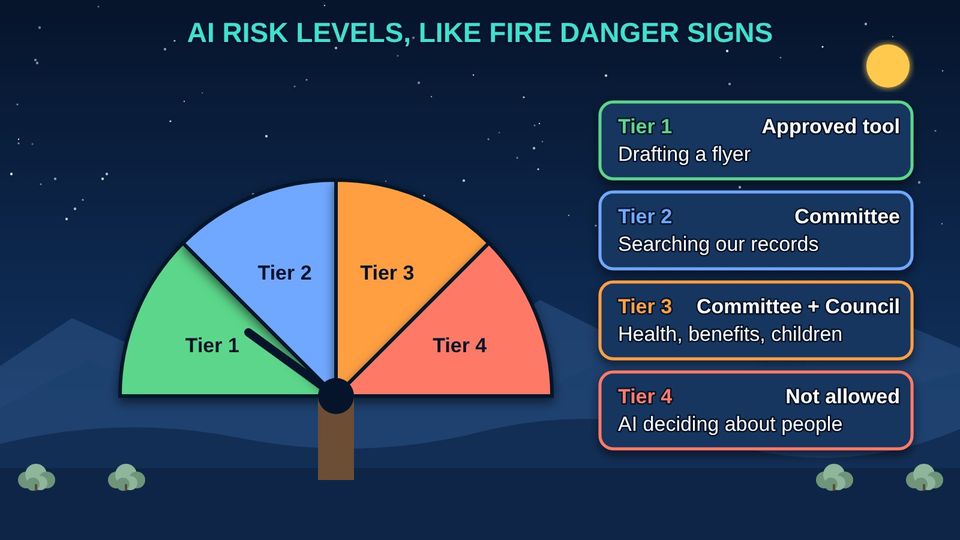
Like fire danger signs, AI uses have levels. Low-risk tools move quickly. High-risk uses pass through every gate and come to the Council. AI may help write the staff report, but the Council decides.
Listen to this part1:06
Read all 4 details
- 1Tier 1: Low. Drafting with public information, like a flyer. An approved AI (artificial intelligence) tool is enough.
- 2Tier 2: Moderate. Working with private office information, with staff reviewing everything. Your AI review committee approves.
- 3Tier 3: High. Anything that could shape decisions about health, benefits, children, justice, housing, or culture. Needs the review committee and a Council resolution.
- 4Tier 4: Not allowed. AI deciding membership, eligibility, child placement, or discipline, or running the water system. Never allowed.
These levels, gates, and approvals are a sample. Adapt them to your Nation's laws and structure with your tribal legal counsel.
Listen to this picture0:53
Read all 6 details
- 1Gate 0: Ask. A department describes what it wants the AI to do and what information it will use.
- 2Gate 1: Plan. The review committee checks the data labels, where the tool will run, and who makes decisions.
- 3Gate 2: Test. The tool is tested on our own documents, including attempts to trick it.
- 4Gate 3: Approve. The review committee approves. High-impact tools also need a Council resolution.
- 5Gate 4: Watch. Once running, it is logged, checked, and reviewed on a schedule.
- 6Gate 5: Retire. When it is no longer needed, it is shut down and its copies of our data are removed.
These levels, gates, and approvals are a sample. Adapt them to your Nation's laws and structure with your tribal legal counsel.
Listen to this picture0:35
Read all 3 details
- 1AI helps prepare. AI (artificial intelligence) can draft summaries and pull facts from our records, with sources.
- 2Staff check it. Staff check every fact and make the report their own. They are the first human in the loop.
- 3The Council decides. The Council approves the AI policy, high-impact AI uses, Sacred-tier decisions, and data sharing, and receives regular reports.
Four risk levels at a glance (sample)
| Level | Examples | Who approves (sample) |
|---|---|---|
| Tier 1: Low | A flyer, a public notice, a first draft from public information | An approved tool; the supervisor |
| Tier 2: Moderate | Searching our own records, drafting letters, meeting minutes, with staff checking everything | The AI review committee |
| Tier 3: High | Anything that could shape a decision about health, benefits, children, justice, housing, or culture | The review committee, an impact assessment, and a Council resolution |
| Tier 4: Not allowed | AI deciding membership, eligibility, child placement, or discipline, or running the water system | No one: never allowed |
These levels, gates, and approvals are a sample. Adapt them to your Nation's laws and structure with your tribal legal counsel.
Part 4Leading the Change
Leaders ask the same questions about AI that they ask about a new truck: what it will really cost, who will run it, whether it does the job, and what it takes from the land.
Listen to this part1:05
Read all 5 details
- 1AI takes the paperwork. AI (artificial intelligence) is best at drafts, searches, and forms. That frees staff for work only people can do.
- 2More time for members. The goal is better service for our people, and help filling jobs that are hard to staff, not fewer jobs.
- 3Tell staff early. People worry when they hear about AI secondhand. Explain what it will and will not do before it arrives.
- 4Train everyone. Training and new skills come before access, so the knowledge stays with our own people.
- 5Let staff help choose. The people who do the work know where AI can help and where it cannot. Involve them from the start.
Listen to this picture0:40
Read all 4 details
- 1Full costs. The price is only part of it. Add equipment, training, support, and staff time, and expect some sticker shock.
- 2Real value. Hours saved, faster service, fewer mistakes, and better records. Some value is hard to count, but name it.
- 3Measure before and after. Time the work before AI and after. If it does not help, stop or change it.
- 4Start small. Try it with one office first, learn, then expand. Benefits may take time to show.
Listen to this picture0:46
Read all 5 details
- 1Big promises. No AI is always right. Ask for test results on our own documents, not a brochure.
- 2Our data stays ours. The contract must say they do not train their AI on our data, where it is kept, and for how long.
- 3The true cost. Ask about monthly, per-use, and data transfer fees, plus support and training.
- 4A way out. Make sure we can get our data back and leave without losing our records.
- 5AI already inside. Vendors are adding AI features to software we already pay for. Ask, check the settings, and apply our rules.
Listen to this picture0:50
Read all 4 details
- 1Big data centers. Most AI (artificial intelligence) runs in huge buildings full of computers that draw a lot of electricity.
- 2Water for cooling. Many data centers use water to keep the computers cool, which matters in the dry Great Basin and across the West.
- 3Growing fast. The International Energy Agency (IEA) estimates that data centers used about 1.5 percent of the world's electricity in 2024, and that this could more than double by 2030.
- 4Right-sized. Choose the smallest tool that does the job. A server sized for our needs uses only what we need.
Before you sign: questions for any AI vendor
The full list, with space for the vendor's answers, is in the program tools below.
- Will you test the tool on our own documents, and show us the results?
- Will you train your AI (artificial intelligence) on our data? The contract should say no.
- Where is our data kept, who can see it, and how long do you keep it?
- What is the full cost each month, including per-use fees, data fees, support, and training?
- How do we get all of our data back, and prove it was deleted, if we leave?
- Which AI features are already switched on inside software we pay for, and can we turn them off?
Have your tribal legal counsel review any AI contract before it is signed.
Part 5Planning Our Path and Guiding Staff
No one plants the whole valley in one season. Start with safe office help, grow with trust, choose where the AI lives, and give staff two simple habits.
Listen to this part0:47
Read all 3 details
- 1Spring: Wave 1. Start with low-risk office help: records search, meeting minutes, drafting, deadlines, and grants. AI (artificial intelligence) drafts and people check.
- 2Summer: Wave 2. Grow into document intake, finance, maps, and compliance tracking.
- 3Fall: Wave 3. Only after testing and Council approval: clinic notes, case summaries, and language tools.
Listen to this picture0:43
Read all 3 details
- 1Our own well. A small AI (artificial intelligence) server on tribal land. Our data stays here, the tribe holds the keys, and it keeps working if the internet goes down.
- 2Rented water. Big outside companies run AI in their own buildings under their rules. Our data would leave our control.
- 3The plan. Choose what fits your needs, budget, and staff. Some Nations start with a small on-site server; others use an outside service under a strong contract that keeps their data theirs. Get real quotes before you budget.
Listen to this picture0:28
Read all 3 details
- 1The board test. Ask yourself: would I pin this on the community board for everyone to see?
- 2Yes. Then it is Public information, and an approved public AI (artificial intelligence) tool may be used.
- 3No. Then it stays inside the tribe's own AI system, and only for approved uses.
Listen to this picture0:32
Read all 4 details
- 1Draft. AI can write a first draft. Treat it as a draft, never a finished product.
- 2Check. Open each source and make sure it says what the draft says.
- 3Make it yours. Fix mistakes, add what only you know, and make it sound like us.
- 4Decide. You are the human in the loop. Decisions about people are yours and go on the record under your name.
When something goes wrong
Ask staff to tell their supervisor and the IT (information technology) office right away if an AI tool shows them information they should not see, gets something important wrong, or acts on its own. Treat it as an incident: write down what happened, stop using the tool for that job, and review it before it is used again.
Give every staff member who uses AI the Staff AI Quick Card in the program tools, and track their training in the sign-off tracker.
ReviewPractice and quiz
Listen to the practice steps1:27
Try it as a Council
A work session for Council and department leaders, about 45 minutes. Use the program tools below.
- List the AI (artificial intelligence) already in use. Ask each department, and include AI features switched on inside software you already own, like email, word processing, and finance systems.
- Sort each use into one of the four risk levels with the AI Use Review Checklist. Flag anything that touches Regulated or Sacred information.
- Choose one low-risk pilot, such as drafting minutes from public meetings, and name the human in the loop who checks every draft.
- Decide who reviews AI uses for your Nation, and which bodies must approve anything cultural or sacred. Ask your tribal legal counsel to help write it down.
- Set a training goal: every staff member who uses AI takes AI for Everyone: What It Is and How to Use It Safely, and signs the Staff AI Quick Card. Track it in the sign-off tracker.
- Put a review on the calendar in six months: what did the pilot save, what went wrong, and what comes next?
Remember
Our data, our decision
Keep a human in the loop
AI helps, the Council decides
Check what you learned
1. A staff member wants to paste clinic notes into a free AI (artificial intelligence) chatbot app to save time. What should happen?
Health records are Regulated information under federal rules. Even without names, notes can identify people. They stay inside the tribe's protected system.
2. Why can't the tribe just tell its AI (artificial intelligence) helper, "Never share private files"?
Prompt injection can override instructions. Permissions are checked before any information reaches the AI, and a person approves any action.
3. A department wants AI (artificial intelligence) to decide who qualifies for emergency assistance. Which level is that?
AI deciding eligibility is never allowed. AI may help organize the paperwork while staff make the decision.
4. A vendor says its AI (artificial intelligence) tool is "always 100 percent accurate" and offers a glossy brochure. What should the Council ask for?
No AI is always right. Testing on your own documents shows how the tool really works for your Nation.
5. The finance office gets a video call that looks and sounds like the Tribal Administrator: wire money today to a new account. What should staff do?
The FBI (Federal Bureau of Investigation) warns that criminals use AI (artificial intelligence) to fake live video calls that appear to come from company leaders. A call back and two approvers stop the scam.
ResourcesProgram tools and resources
Program tools
Free to use, copy, and adapt for your community.
DOCXAI Use Review Checklist (Word)The four risk levels and six gates as a checklist, with sign-off lines. A sample to adapt with legal counsel.DownloadPDFAI Use Review Checklist (PDF)The same checklist, ready to print.DownloadDOCXQuestions to Ask an AI Vendor (Word)Questions on testing, data, security, cost, and a way out, with space for the vendor's answers.DownloadPDFQuestions to Ask an AI Vendor (PDF)The same questions, ready to print and bring to a vendor meeting.DownloadPDFStaff AI Quick CardOne page for every desk: the community board test and four checks before you send.DownloadXLSXAI Training Sign-off TrackerTrack staff, classes, dates, quiz scores, and supervisor sign-off, with a summary.Download
Words to know
- Artificial intelligence (AI)
- One word for a whole family of computer tools that find patterns in many examples and use them to make answers, suggestions, or decisions. It is not new: the name dates to the 1950s.
- Data sovereignty
- The right of a Native nation to govern the collection, ownership, and use of its own information.
- Data label
- One of five places that decide how information is handled: Public, Internal, Private, Regulated, and Sacred.
- Sacred
- Cultural, ceremonial, and sacred knowledge. It stays out of AI unless the bodies your Nation chooses, such as a cultural committee, Elders, the Tribal Historic Preservation Officer, and the Council, approve a specific use.
- Tribal Historic Preservation Officer (THPO)
- The tribal official who protects the tribe's historic and cultural places and helps decide how cultural information is used.
- CARE Principles
- Four principles for Indigenous data: Collective benefit, Authority to control, Responsibility, and Ethics.
- Traditional Knowledge (TK) Labels
- Traditional Knowledge Labels from the Local Contexts project that show a community's rules for who may see and use its knowledge.
- Automation bias
- Trusting a machine more than what you can see for yourself.
- Prompt injection
- Hidden words in a document or email that try to trick an AI into doing something it should not.
- Human in the loop
- A trained person checks and approves what the AI produces before it has any effect. Nothing is sent, paid, filed, or changed, and no decision about a person is made, until that person approves, and their name goes on the record.
- Risk level (tier)
- One of four levels, from low to not allowed, that sets how much approval an AI use needs.
- High-impact AI
- AI that could shape a decision about someone's health, benefits, children, justice, job, housing, water system, or culture.
- Gate
- One of six check points every AI tool passes: ask, plan, test, approve, watch, and retire.
- AI impact assessment
- A short report on what an AI tool is for, what information it uses, its risks, testing, and who approved it.
- Vendor lock-in
- When it is hard to leave a company's product because your data or work is stuck in it.
- Full cost
- Everything an AI tool really costs: the price, equipment, training, support, data fees, and staff time, over the years we use it.
Learn more
- NIST: AI Risk Management FrameworkThe free federal framework for managing AI risks, with a Generative AI Profile.
- Carroll et al.: The CARE Principles for Indigenous Data GovernanceThe article that sets out Collective benefit, Authority to control, Responsibility, and Ethics.
- Local Contexts: Traditional Knowledge (TK) LabelsLabels a community can use to show its rules for its own knowledge.
- UK NCSC: Prompt injection is not SQL injectionWhy hidden instructions may never be fully fixed, and how to limit the harm.
- IEA: Energy and AIHow much electricity data centers and AI use now, and may use by 2030.
- CISA: Artificial IntelligenceThe national cyber defense agency's AI guidance and publications.
For teachers and digital navigators: how to run this class (Two 60-minute sessions)
Lesson plan
- 5 minSession 1. Read the truck story. Ask: what AI do our departments already use?
- 20 minPart 1: water, five places, and the sacred path. Ask which bodies approve uses of cultural information in your Nation.
- 20 minPart 2: risks and guards. Walk through the human in the loop picture with a real task, like answering a member's letter.
- 15 minSort five real examples from your departments into the five places. End Session 1.
- 10 minSession 2. Part 3: risk levels and gates. Run one real AI request through the checklist together.
- 20 minPart 4: people, cost, vendors, and power. Read the vendor questions aloud and decide which ones you would add.
- 15 minPart 5: the garden, the well, and the two staff habits. Hand out the Staff AI Quick Card.
- 15 minQuiz together, the three Remember cards, and agree on next steps from Try it as a Council.
What you need
- Projector or large TV for the slides
- Printed handouts, one per person
- Printed copies of the AI Use Review Checklist and Questions to Ask an AI Vendor
- A list of AI tools and features your departments already use, gathered ahead of time
- Optional: your Nation's current data, records, or technology policies
Talk about it
- Which of our information should never leave tribal control, and who decides?
- Which decisions about members must always be made by a person, and how will we write that down?
- What is one small, safe first use of AI that would give our staff more time for members?
The PowerPoint slides follow this plan, with the story and every picture detail in the speaker notes.
References
- Carroll, S. R., Garba, I., Figueroa-Rodríguez, O. L., Holbrook, J., Lovett, R., Materechera, S., Parsons, M., Raseroka, K., Rodriguez-Lonebear, D., Rowe, R., Sara, R., Walker, J. D., Anderson, J., & Hudson, M. (2020). The CARE principles for Indigenous data governance. Data Science Journal, 19(1), Article 43. https://doi.org/10.5334/dsj-2020-043
- Dartmouth College. (n.d.). Artificial intelligence (AI) coined at Dartmouth. https://home.dartmouth.edu/about/artificial-intelligence-ai-coined-dartmouth
- Federal Bureau of Investigation. (2024, December 3). Criminals use generative artificial intelligence to facilitate financial fraud (Alert No. I-120324-PSA). Internet Crime Complaint Center. https://www.ic3.gov/PSA/2024/PSA241203
- International Energy Agency. (2025). Energy and AI. https://www.iea.org/reports/energy-and-ai
- Local Contexts. (n.d.). TK Labels. https://localcontexts.org/labels/traditional-knowledge-labels/
- National Cyber Security Centre. (2025, December 8). Prompt injection is not SQL injection (it may be worse). https://www.ncsc.gov.uk/blog-post/prompt-injection-is-not-sql-injection
- National Institute of Standards and Technology. (2023). Artificial intelligence risk management framework (AI RMF 1.0) (NIST AI 100-1). https://doi.org/10.6028/NIST.AI.100-1
- National Institute of Standards and Technology. (2024). Artificial intelligence risk management framework: Generative artificial intelligence profile (NIST AI 600-1). https://doi.org/10.6028/NIST.AI.600-1
- Shehabi, A., Smith, S. J., Hubbard, A., Newkirk, A., Lei, N., Siddik, M. A. B., Holecek, B., Koomey, J. G., Masanet, E. R., & Sartor, D. A. (2024). 2024 United States data center energy usage report (LBNL-2001637). Lawrence Berkeley National Laboratory. https://doi.org/10.71468/P1WC7Q
Building a digital equity program?
Numu helps tribal governments plan, fund, and run broadband and digital equity programs. We are glad to talk through your plans.
Contact our team