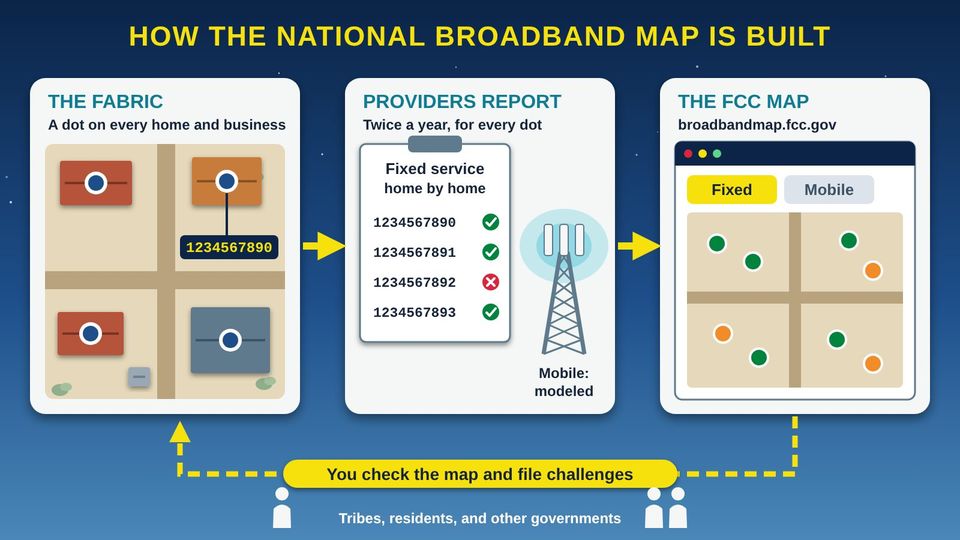
Picture the tribal housing office on a Monday morning. A grant application is due, and it asks how many homes have no internet. Someone pulls up the FCC (Federal Communications Commission) map. A dot sits on the Smiths' storage shed instead of their house. Three new homes past the cattle guard have no dot at all. A company says fast internet is available on a road where everyone knows there is no line. Funding programs start from this map, so every mistake matters. The good news: Tribes can check the map and file challenges to fix it. This guide shows your staff how, step by step.
Start here1The National Broadband Map2The Broadband Data Collection (BDC)3Tribal Data Issues4Challenging the Map5Keeping It RightPractice and quizProgram tools and resources
Start hereWelcome
Listen to the story1:18
What you will learn
- Explain how the FCC (Federal Communications Commission) National Broadband Map is built from provider filings and the Fabric of locations
- Spot the map mistakes common on tribal lands, such as homes with no address, dots on sheds, missing homes, and service that is not really there
- File location and availability challenges, and plan a bulk challenge as a Tribal government
- Keep your community's map right year after year with a filing calendar, a tracker, and Council support
In this guide
1The National Broadband MapWhat the FCC (Federal Communications Commission) map shows, where its data comes from, and how to find your Tribal area on it.1 picture2The Broadband Data Collection (BDC)Twice a year, providers report service location by location against the Fabric, the FCC's list of every place broadband could be installed.1 picture3Tribal Data IssuesHomes with no address, homes that are missing, and service that is shown but not real: why tribal lands are so often wrong on the map.1 picture4Challenging the MapHow to fix the map, one home at a time or in bulk as a Tribal government.2 pictures5Keeping It RightA yearly routine, the 2026 rule changes, and how the map ties to funding.1 picture✓Practice and quizTry it yourself, the three things to remember, and a short quiz.
Part 1The National Broadband Map
What the FCC (Federal Communications Commission) map shows, where its data comes from, and how to find your Tribal area on it.
Listen to this part2:02
Read all 5 details
- 1The Fabric: a dot on every location. The Fabric is a dataset of every place in the United States where home or business internet is, or could be, installed. CostQuest Associates builds it for the FCC (Federal Communications Commission). Each place is a dot with its own Location ID number.
- 2Fixed providers report every dot. Internet providers file twice a year: by March 1 for service as of December 31, and by September 1 for service as of June 30. A fixed provider says, location by location, which dots it serves or could serve. A Tribe that runs its own internet network must file too.
- 3Mobile coverage is a computer model. Cell companies do not check every road. They use computer models (called propagation models) to predict where 3G, 4G LTE (Long-Term Evolution), and 5G signals reach outdoors. The map does not show service inside buildings.
- 4The FCC publishes the map. The FCC puts it all together at broadbandmap.fcc.gov. The map opens on the Fixed tab, and mobile coverage is on its own Mobile tab. Tools on the site can show a Tribal area and compare it to non-Tribal areas.
- 5You check it and challenge it. The law that created this map, the Broadband DATA Act (Broadband Deployment Accuracy and Technological Availability Act), lets the public challenge it. Tribal governments, residents, and others can file when a dot or a provider's claim is wrong.
Before you start
This guide is general information, not legal advice. FCC rules and forms change often. Check the FCC BDC (Broadband Data Collection) Help Center before you file, and talk with tribal legal counsel before your Council adopts a resolution.
The pieces of the map
The law
The Broadband DATA Act (Broadband Deployment Accuracy and Technological Availability Act), Public Law 116-130, was signed on March 23, 2020. It told the FCC to build a more accurate map. The rules are in Title 47 of the Code of Federal Regulations, Part 1, Subpart V.
The data collection
The FCC gathers the data through the BDC (Broadband Data Collection). Providers file twice a year: by March 1 (service as of December 31) and by September 1 (service as of June 30).
The Fabric
A dataset of every location in the United States and its Territories where fixed internet is or could be installed. CostQuest Associates builds it for the FCC. Each location has a Location ID.
The map
The FCC publishes it all at broadbandmap.fcc.gov. It opens on the Fixed tab. Mobile coverage is on a separate Mobile tab.
Fixed and mobile are reported differently
| Fixed tab | Mobile tab | |
|---|---|---|
| How providers report | Location by location, using Fabric points | Computer models of where 3G, 4G LTE (Long-Term Evolution), and 5G-NR (5G New Radio) signals reach |
| What it shows | Which providers say they serve each location, and how | Predicted outdoor coverage; indoor service is not shown |
| Who can challenge | Tribal, state, and local governments, consumers, and other entities or individuals | Consumers and Tribal, state, and local governments |
See your Tribal area on the map
- 1Open the map
Go to broadbandmap.fcc.gov. It opens on the Fixed tab.
- 2Open Area Summary
Use the Area Summary tool and choose "Tribal area" as the type of area. Pick your reservation or tribal land.
- 3Compare
Use the Area Comparison tool to compare Tribal and non-Tribal areas, for example tribal land and the county around it.
- 4Save what you see
Take dated screenshots. The map now keeps only the four most recent data versions, about two years, so your own copies are your history.
Part 2The Broadband Data Collection (BDC)
Twice a year, providers report service location by location against the Fabric, the FCC's list of every place broadband could be installed.
Listen to this part1:55
Read all 6 details
- 1A home counts. A BSL (broadband serviceable location) is a home or business where home-style internet service is, or can be, installed. On the map, each one is a single dot placed inside the building.
- 2Every location has an ID tag. Each BSL has a unique FCC (Federal Communications Commission) Location ID, a map point, an address if one exists, a count of units, and a land-use type. IDs stay the same within one version of the Fabric but can change in the next version, so always write down the version with the ID.
- 3An apartment building is usually one dot. An apartment building is usually one BSL with a unit count, not one dot per apartment. A building with 8 homes may show one dot and the number 8.
- 4A business counts. Businesses that could buy everyday internet service count as BSLs too. Most community anchor institutions, such as schools and libraries, are not BSLs.
- 5Sheds, garages, and barns do not count. Garages, sheds, and barns are not BSLs. If the map puts the dot on your shed instead of the house, that is a mistake you can fix.
- 6Empty lots do not count. An empty lot is not a BSL, and neither is a home that cannot be lived in. A new home counts once it is built. Do not ask the FCC to add a lot where nobody lives yet.
What counts as a BSL (broadband serviceable location)
A BSL is a home or business where everyday home or business internet is, or can be, installed. The map places one point inside the structure.
| Counts as a BSL | Does not count |
|---|---|
| A house or mobile home where people live | A garage, shed, or barn |
| An apartment building (usually one BSL, with a count of units) | An empty lot |
| A business that could buy everyday internet service | A home that cannot be lived in |
| A home with no street address (it still counts) | Most community anchor institutions, such as schools and libraries |
What the FCC keeps for each location
| Item | What it means for you |
|---|---|
| Location ID | A unique number, like 1234567890. It stays the same within one Fabric version but can change in the next one. |
| Latitude and longitude | The map point, which should sit inside the right building. |
| Address | Included if one exists. Some locations have no address. |
| Unit count | How many homes or businesses are in the building. |
| Land-use category | What the building is used for, such as a home or a business. |
If your Tribe runs its own network
Governments that provide facilities-based internet service, such as Tribal telecommunications companies, must file availability data in the BDC and register as a Service Provider. That is separate from registering as a governmental entity to file challenges.
Part 3Tribal Data Issues
Homes with no address, homes that are missing, and service that is shown but not real: why tribal lands are so often wrong on the map.
Listen to this part2:02
Read all 6 details
- 1A home with no street address. Many homes on tribal lands have no street address, and some roads have no names. The map can miss these homes or place them badly. The Native Nations Communications Task Force told the FCC (Federal Communications Commission) that maps should be based on actual reports from Tribes.
- 2The dot is on the shed. Here the dot sits on a shed, not the house. Sheds do not count. Fix it with a location challenge for incorrect placement, or in a bulk file use the code for the wrong building on the parcel.
- 3A home with no dot. This home is missing from the map. If it is not on the map, it is not counted when internet funding is planned. Use Add a New Location and drag the pin onto the house.
- 4The dot is on the road. This dot landed on a dirt road, not a building. That is a placement mistake. Move it onto the right home with a location challenge.
- 5A provider claims service it does not offer. The map says fiber is available here, but no line reaches this house. The GAO (Government Accountability Office) found in 2018 that older FCC data overstated internet access on tribal lands. File an availability challenge against that provider.
- 6Modeled cell coverage that is not real. Cell companies predict coverage with computer models, so the map can show 5G where your phone has no bars. Speed tests with the FCC Mobile Speed Test app are your evidence for a mobile challenge.
What the record shows
Old data overstated access
In 2018, the GAO (Government Accountability Office) reported that the FCC's older Form 477 data overstated internet access on tribal lands. Its recommendations have been put in place, including a challenge process launched in January 2021 and Tribal workshops in December 2021 and July 2022.
A big gap
In 2022, the GAO reported that more than 18% of people on tribal lands had no broadband service as of 2020, compared with about 4% of people elsewhere. It recommended a national strategy.
No street addresses
In 2019, the Native Nations Communications Task Force told the FCC that some Tribes lack street names and home addresses. It recommended that maps "be based upon actual reports from Tribes."
Modeled mobile coverage
Mobile coverage on the map comes from providers' computer models. It does not show indoor service, and it may not match what your phone shows on a back road.
Common mistakes and how to fix each one
| What you see | Type of challenge | Who can file |
|---|---|---|
| A home has no dot | Location: add a new location | Residents, Tribal government, others |
| The dot is on a shed, garage, or road | Location: incorrect placement | Residents, Tribal government, others |
| A dot is on an empty lot or a barn | Location: remove a location | Residents, Tribal government, others |
| Wrong address or wrong number of units | Location: address or unit count | Residents, Tribal government, others |
| A home is shown as a business, or the other way around | Location: building type | Residents, Tribal government, others |
| A provider claims service it does not offer | Fixed availability challenge | Residents, Tribal government, others |
| The map shows cell coverage where there is none | Mobile challenge with speed tests | Residents and Tribal, state, and local governments |
Tribal data sovereignty
The facts your staff collect about homes and families belong to your Tribe. Decide ahead of time who keeps the forms, where the data is stored, and what is shared. Send the FCC only what a challenge needs, ask permission before you use what people tell you, and keep the Fabric license rules in mind: the data cannot be used for mailing lists or marketing.
Part 4Challenging the Map
How to fix the map, one home at a time or in bulk as a Tribal government.
Listen to this part1:22
Read all 6 details
- 1You file. Anyone can file a fixed availability challenge: residents, Tribal governments, and others. You pick the provider, the reason, and attach your proof, such as a screenshot or an email from the company.
- 2The provider has 60 days. The provider gets 60 days to agree (concede) or dispute (rebut) your challenge. Mark the due date on your tracker.
- 3If the provider agrees. If the provider agrees, it has 30 days to fix its data. Check the map after that and write down the result.
- 4If the provider disputes. If the provider disputes your challenge, you and the provider have 60 days to try to settle it. Keep every email and note every phone call.
- 5The FCC decides. If you cannot settle it, the FCC (Federal Communications Commission) decides within 90 days.
- 6If you win. If the FCC decides for you, the provider has 30 days to fix its data. Then check the map again with the next update.
Listen to this picture2:01
Read all 6 details
- 1Register and sign the license. Register in the FCC BDC (Broadband Data Collection) system as a Tribal governmental entity and sign the CostQuest license. A Tribe that registers this way automatically gets a free Tier 2 license made for Tribal entities, which opens the full Fabric data.
- 2Check homes in the field. Visit homes with the Household Map Check Worksheet. Write down the address or "no address," GPS (Global Positioning System) coordinates, and whether the dot is on the right building. Ask permission before you use what people tell you.
- 3Compare in GIS. In GIS (geographic information system) software, lay your own address points over the FCC Fabric dots. Look for homes with no dot, dots on the wrong building, and dots on roads. Do not add empty lots.
- 4Build the CSV file. A bulk Fabric challenge is a CSV (comma-separated values) file with 21 required columns, such as location_id, category_code, bsl_lacks_address_flag, latitude, and longitude. Code 1 means a missing location, and code 5 means the dot is on the wrong building on the parcel.
- 5Upload it. Upload the file in the BDC system. Use the FCC's sample template and match its column headers exactly. A Tribal government must show clear and convincing evidence, a strong, well-documented case.
- 6Track and recheck. Write down each location, the date filed, and the result in the Map Challenge Tracker. Accepted fixes appear in a later map version, so check each new version and keep your records.
Three kinds of challenges
| Kind | What it fixes | Good evidence |
|---|---|---|
| Location (Fabric) challenge | Missing, extra, or misplaced locations; wrong address, units, or building type | Your own address points, field visit notes, photos, GPS (Global Positioning System) coordinates |
| Availability challenge | A provider says it offers service at a location, but it does not | Emails, screenshots, letters from the provider; for bulk: permits, rights-of-way records, franchise agreements |
| Mobile challenge | The map shows cell coverage or speeds that are not really there | Speed tests from the FCC Mobile Speed Test app |
How strong your proof must be
| Who files | Standard | In plain words |
|---|---|---|
| A resident (consumer) | Preponderance of the evidence | Your proof shows it is more likely true than not |
| A Tribal, state, or local government, or any bulk challenger | Clear and convincing evidence | A stronger, well-documented case |
Timelines at a glance
| Process | What happens and when |
|---|---|
| Availability challenge | Provider has 60 days to agree or dispute. If it agrees: 30 days to fix. If it disputes: 60 days to settle. Then the FCC decides within 90 days. If you win: 30 days to fix. |
| Location (Fabric) challenge | Reviewed on a rolling basis. Accepted challenges filed by early March usually appear by November; by early September, usually the following May. |
| 2026 example | Challenges filed by September 1, 2026 are considered for the December 2026 Fabric version. The current version is the June 2026 Fabric. |
| Bulk fixed availability challenge | No deadline. Filed on a rolling basis, but only against the most recent snapshot (as-of) date. |
| Bulk Fabric challenge | Open on an ongoing basis since September 2022. |
| Mobile challenge | The provider has 60 days to respond. |
File an individual availability challenge
- 1Find the home
Go to broadbandmap.fcc.gov, stay on the Fixed tab, and search for the address or click the location.
- 2Start the challenge
Click Availability Challenge. Enter your name, email, and filer type, then verify your email.
- 3Choose challenge or feedback
Choose a formal challenge, or send feedback only if you have no proof yet.
- 4Pick the provider
Choose the provider and the technology you are challenging.
- 5Pick a reason
Choose one of the 10 reasons, such as no service offered, cannot connect within 10 business days, an extra installation fee, or the advertised speed is not available. Describe what happened.
- 6Add proof
Upload screenshots, emails, or letters from the provider.
- 7Certify and submit
Confirm the information is true and submit. Write the date in your tracker so you can watch the provider's 60-day window.
Not every problem is a challenge
If your service is slower than the company advertised, that is a consumer complaint, not a map challenge. If a provider that does serve you is missing from the map, that is crowdsource data. Crowdsource data needs no response from the provider, while a challenge must include evidence.
File a location challenge, or add a missing home
- 1Click the location
On the map, click the dot that is wrong.
- 2Start the challenge
Click Location Challenge and enter your contact details.
- 3Pick the type
Choose one: address or unit count, remove a location, building type, incorrect placement, or add a new location.
- 4To add a missing home
Click the structure and choose Add a New Location. Drag the pin onto the building, not onto a road and not onto a building that already has a dot.
- 5Address or no address
Enter the address, or check "no address" if the home does not have one.
- 6Certify
Confirm the information is true and submit.
Plan a bulk challenge as a Tribal government
A bulk challenge lets your Tribe fix many locations at once. It takes planning, a GIS (geographic information system) person, and good records.
- 1Get Council approval
Ask Council to authorize staff to register and file. The Council briefing in the Program tools includes a sample resolution.
- 2Register as a governmental entity
Create an account in the BDC system as a Tribal governmental entity.
- 3Sign the Fabric license
The full Fabric dataset is free but requires a CostQuest license. A Tribe that registers as a Tribal governmental entity automatically gets a Tier 2 license made for Tribal entities. A Tribal ISP (internet service provider) may first receive the generic agreement.
- 4Check homes in the field
Use the Household Map Check Worksheet. Record GPS coordinates at each home.
- 5Compare in GIS
Lay your address points over the Fabric points. Flag homes with no dot, dots on the wrong building, and dots on roads.
- 6Build the CSV file
Use the FCC's bulk Fabric template. The CSV (comma-separated values) file has 21 required header fields, including location_id, category_code, bsl_lacks_address_flag, latitude, and longitude. There are 8 category codes; for example, 1 means a missing location and 5 means the wrong building on the parcel.
- 7Upload and track
Upload the file in the BDC system. Record every location and result in the Map Challenge Tracker.
GIS and CSV tips for bulk Fabric challenges
- Compare your own address points with the Fabric points in GIS before you build the file.
- Flag any Fabric point that sits on a road.
- Use code 5 (wrong building on the parcel), not code 1 (missing location), when the dot is on the wrong building.
- Do not ask to add empty lots.
- Add a location with latitude and longitude only (no address) only where the area truly lacks addresses, and set the no-address flag.
- For a bulk fixed availability challenge, follow the separate bulk fixed spec and match its headers exactly.
- Keep the Fabric version with every Location ID, because IDs can change between versions.
- Save a copy of every file you upload and every response you get.
Where to find the bulk file formats
| Document | Web address |
|---|---|
| Bulk Fabric challenge spec | https://www.fcc.gov/sites/default/files/bdc-bulk-fabric-challenge-spec.pdf |
| Bulk Fabric sample template (CSV) | https://www.fcc.gov/sites/default/files/bdc-bulk-fabric-challenge-template-sample.csv |
| How to format a bulk Fabric challenge | https://help.bdc.fcc.gov/hc/en-us/articles/8103890293275-How-to-Format-a-Bulk-Fabric-Challenge |
| Bulk fixed availability challenge spec | https://www.fcc.gov/sites/default/files/bdc-bulk-fixed-challenge-spec.pdf |
Test mobile coverage
- 1Get the app
Install the FCC Mobile Speed Test app on an iPhone (iOS) or Android phone.
- 2Pick the mode
Choose Outdoor mode, or In-Vehicle mode while someone else drives.
- 3Use cellular data
Turn Wi-Fi off so the test uses cellular data.
- 4Test at the right time
Run tests between 6:00 a.m. and 10:00 p.m.
- 5Know the bar
A test fails if it is below 5/1 Mbps (megabits per second, download/upload) for 4G LTE, or below 7/1 or 35/3 Mbps for 5G. Tests are grouped in hexagons of about 1 square kilometer.
- 6Go bulk if you have many tests
Tribal governments can file bulk mobile challenges: a JSON (JavaScript Object Notation) file, a description of your methods, and certification by a qualified engineer or official. Tests from iPhones (iOS devices) cannot be used in a bulk mobile challenge. The provider has 60 days to respond.
Part 5Keeping It Right
A yearly routine, the 2026 rule changes, and how the map ties to funding.
Listen to this part1:53
Read all 6 details
- 1Provider filings are due twice a year. Internet providers file by March 1, showing service as of December 31, and by September 1, showing service as of June 30. If your Tribe runs its own internet network, it must file on the same schedule.
- 2Snapshot dates. Each filing is a snapshot of one day: December 31 or June 30. For 2026, the snapshot was June 30, 2026, and the filing window ran July 1 to September 1, 2026.
- 3The map updates every six months. Map location data updates every six months. Accepted Fabric fixes filed by early March usually appear by November, and fixes filed by early September usually appear the next May.
- 4Check homes and send Fabric fixes. Plan field checks so your Fabric fixes go in before early March and early September. Fabric challenges are reviewed on a rolling basis, so you can also send them any time.
- 5Recheck each new map. When a new version comes out, check your locations again. Location IDs can change between Fabric versions, and the map now shows only the four most recent data versions, about two years.
- 6Availability challenges, any time. You can file availability challenges, and bulk fixed challenges, all year. Bulk fixed challenges have no deadline but apply only to the most recent snapshot date.
A yearly mapping calendar
| When | What happens | What your staff do |
|---|---|---|
| January to early March | Providers prepare filings with data as of December 31 | Check homes; send Fabric fixes before early March |
| March 1 | Provider filings due (data as of December 31) | If your Tribe is a provider, file |
| May | Fixes filed by early September usually appear | Recheck your locations and IDs |
| June 30 | Snapshot (as-of) date for the fall filing | Save screenshots of your area |
| July to early September | Filing window (in 2026: July 1 to September 1) | Check homes; send Fabric fixes before early September |
| September 1 | Provider filings due (data as of June 30) | If your Tribe is a provider, file |
| November | Fixes filed by early March usually appear | Recheck your locations and IDs |
| All year | Availability and bulk fixed challenges accepted | File when you find a problem; track the 60-day clock |
What changed in 2026
Coverage restoration
Since May 7, 2026, providers can restore locations that were removed after they lost or conceded a challenge, by sending infrastructure data (FCC public notice DA 26-420). The notice does not say whether challengers are told, so recheck locations you won.
Sixth Report and Order
Adopted May 20, 2026 (FCC 26-33). Providers are no longer notified of Fabric challenges or allowed to respond during the Fabric cycle, but they are told about accepted ones. The BDC system now automatically removes data that fails verification or audit.
Pending proposals
The FCC has proposed shrinking the fixed challenge process, now two steps of up to 120 days, into one 60-day window; easier restoration; and ending reporting below 25/3 Mbps (megabits per second). The Benton Institute says shorter timelines would be "significantly more constraining" for Tribal governments.
Two years of history
The map now shows only the four most recent data versions, about two years (DA 26-630). Keep your own dated copies.
How the map connects to BEAD funding
BEAD (Broadband Equity, Access, and Deployment) started from the National Broadband Map. States ran their own challenge portals, but BEAD could not add or remove Fabric locations. That means a missing home had to be fixed with the FCC, not in the state process.
NTIA (National Telecommunications and Information Administration) and your state broadband office set the rules for any new BEAD challenge window. Tribal governments are not always named as eligible challengers, so ask your state broadband office early how your Tribe can take part.
Keep it right: a short routine
- Name one staff lead for the map and one backup.
- Keep a master list of homes with GPS coordinates, even where there are no street addresses.
- Save the Fabric version with every Location ID.
- Recheck your locations each time a new map version comes out.
- Recheck locations you won in a challenge, since providers can now ask to restore them.
- Watch for final FCC rules on the pending proposals, and ask ONAP (the FCC's Office of Native Affairs and Policy) about consultation and training.
- Report progress to Council twice a year.
Help from the FCC
ONAP (Office of Native Affairs and Policy), created in 2010, handles government-to-government consultation with Tribes and holds regional and national Tribal consultation and training workshops. In 2023 it announced BDC deadlines, the no-cost Fabric license, and one-on-one video help for Tribes. Ask what help is available now.
ReviewPractice and quiz
Listen to the practice steps1:20
Try it: check three homes you know
About 20 minutes with a computer or phone. Choose three homes you know well, such as your own, a relative's, and the tribal office. Members who live off the reservation, in nearby towns such as Winnemucca, can check their homes the same way.
- Go to broadbandmap.fcc.gov and search for the first home's address. If it has no address, zoom in on the map and find the building.
- Look at the dot. Is it on the right building, or on a shed, a road, or the neighbor's house? Is there a dot at all?
- Click the dot and write down the Location ID and the providers listed on the Fixed tab.
- Compare that list with what you know. Does each provider really offer service there? Is anyone missing?
- Switch to the Mobile tab and compare the coverage shown with what your phone gets at that home.
- Repeat for the other two homes. Write any mistakes on the Household Map Check Worksheet and bring them to your staff lead.
Remember
Every home deserves its own dot on the map
Your Tribe's own records are your best evidence
Recheck every six months; IDs can change
Check what you learned
1. On the map, the dot for your aunt's home sits on her storage shed, about 50 feet from the house. What should you file?
The home is a real location, but its dot is on the wrong building. Incorrect placement moves the dot onto the house. Removing it would take the home off the map.
2. Your Tribe files a challenge saying a company does not offer the fiber service the map shows on Willow Road. What happens next?
In an availability challenge, the provider gets 60 days to concede or rebut. If it disputes, both sides get 60 days to settle before the FCC decides.
3. Housing staff found 120 homes missing from the map. What should they do first to file them all at once?
A bulk Fabric challenge starts with registering as a Tribal governmental entity, which comes with a Tier 2 Fabric license. Then staff build one CSV (comma-separated values) file for all the homes.
4. A program manager wants to use the Fabric address list to mail a newsletter to every home on the reservation. What is the right answer?
The full Fabric data is free, but its CostQuest license does not allow mailing lists or marketing. Use your Tribe's own records for outreach.
5. You are driving the back roads to gather evidence that the map overstates cell coverage. Which plan works?
Mobile challenges use the FCC (Federal Communications Commission) Mobile Speed Test app, on cellular data rather than Wi-Fi, in Outdoor or In-Vehicle mode, from 6 a.m. to 10 p.m.
ResourcesProgram tools and resources
Program tools
Free to use, copy, and adapt for your community.
PDFHousehold Map Check Worksheet (print)A door-to-door form to check each home's dot, ID, providers, and speed, with a consent line. Ready to print.DownloadDOCXHousehold Map Check Worksheet (edit)The same worksheet in Word, so you can add your Tribe's name and adapt it.DownloadXLSXMap Challenge TrackerTrack locations to fix, availability challenges with automatic 60-day due dates, and the filing calendar.DownloadDOCXCouncil Briefing: Why Our Map MattersA two-page plain briefing for Council, with a sample resolution to adapt with tribal legal counsel.Download
Words to know
- FCC
- Federal Communications Commission. The U.S. agency that runs the National Broadband Map and decides map challenges.
- BDC
- Broadband Data Collection. The FCC program and online system where providers file their data and where challenges are filed.
- Broadband DATA Act
- Broadband Deployment Accuracy and Technological Availability Act. The 2020 law that told the FCC to build a more accurate map and a way to challenge it.
- National Broadband Map
- The FCC's public map at broadbandmap.fcc.gov that shows reported fixed and mobile internet service.
- Fabric
- The FCC's dataset of every location where fixed internet is or could be installed, built by CostQuest Associates.
- BSL
- Broadband serviceable location. A home or business where everyday internet service is, or can be, installed. Each is one dot on the map.
- Location ID
- The unique FCC number for one BSL. It stays the same within one Fabric version but can change in the next.
- Location challenge
- Also called a Fabric challenge. A request to add, remove, move, or correct a location on the map.
- Availability challenge
- A request to correct a provider's claim that it offers service at a location.
- Bulk challenge
- One file that challenges many locations at once, often filed by a Tribal, state, or local government.
- Crowdsource data
- Information the public sends the FCC without a formal challenge, such as a missing provider. The provider does not have to respond.
- Clear and convincing evidence
- The proof standard for government and bulk challengers: a strong, well-documented case.
- Propagation model
- A computer model that predicts where a cell signal reaches. Mobile coverage on the map comes from these models.
- GIS
- Geographic information system. Software for making and comparing maps, such as your address points and the FCC's dots.
- CSV
- Comma-separated values. A simple spreadsheet file format used for bulk challenges.
- BEAD
- Broadband Equity, Access, and Deployment. A federal grant program for internet service that started from the National Broadband Map.
Learn more
- FCC: National Broadband MapLook up any home, file challenges, and compare Tribal areas.
- FCC BDC Help Center: FAQs for government entitiesHow Tribal and local governments register and file.
- FCC BDC Help Center: How to submit a location challengeStep-by-step help for fixing a single location.
- FCC BDC Help Center: How to format a bulk Fabric challengeColumn headers, codes, and tips for bulk files.
- FCC: ONAP's mission and prioritiesThe FCC's Office of Native Affairs and Policy, for consultation and training.
- GAO: Tribal broadband report (GAO-22-104421)The federal review of internet gaps on tribal lands.
For teachers and digital navigators: how to run this class (two 60-minute staff sessions)
Lesson plan
- Session 1The National Broadband Map, the BDC, and Tribal Data Issues. Goal: every staff member can find and judge a location.
- 15 minThe National Broadband Map: have each pair find the tribal office on the map.
- 10 minThe Broadband Data Collection (BDC): what counts as a location. Write down the office's Location ID.
- 15 minTribal Data Issues: explore the mistakes picture. Each pair checks three homes they know and marks any mistakes.
- Session 2Challenging the Map and Keeping It Right. Goal: staff can file a challenge and the team has a plan.
- 20 minChallenging the Map: walk through an individual location challenge on screen, stopping before you submit. Review the bulk steps.
- 15 minKeeping It Right: fill in the tracker's Calendar sheet for the next twelve months with names next to each date.
- 10 minPractice and quiz together, then assign owners for the household check.
What you need
- Projector or large TV, and a laptop with internet
- One laptop per two staff members, with broadbandmap.fcc.gov open
- Printed Household Map Check Worksheets, five per person
- The Map Challenge Tracker open on a shared computer
- Your Tribe's address or housing list, and GIS layers if you have them
- A phone with the FCC Mobile Speed Test app installed
Talk about it
- Which homes in our community are most likely to be missing or misplaced on the map, and why?
- Who should hold the information we collect door to door, and what will we share with the FCC?
- What would we need from Council, and from partners, to file a bulk challenge this year?
The PowerPoint slides follow this plan, with the story and every picture detail in the speaker notes.
References
- Benton Institute for Broadband & Society. (2026, May 4). The FCC is proposing changes in how it maps the digital divide. https://www.benton.org/blog/fcc-proposing-changes-how-it-maps-digital-divide
- Broadband DATA Act, Pub. L. No. 116-130, 134 Stat. 228 (2020). https://www.congress.gov/116/plaws/publ130/PLAW-116publ130.pdf
- Data verification, 47 C.F.R. § 1.7006 (2026). https://www.ecfr.gov/current/title-47/chapter-I/subchapter-A/part-1/subpart-V/section-1.7006
- Federal Communications Commission. (n.d.-a). About the Fabric: What a broadband serviceable location (BSL) is and is not. BDC Help Center. https://help.bdc.fcc.gov/hc/en-us/articles/16842264428059-About-the-Fabric-What-a-Broadband-Serviceable-Location-BSL-Is-and-Is-Not
- Federal Communications Commission. (n.d.-b). Bulk mobile challenge process overview. BDC Help Center. https://help.bdc.fcc.gov/hc/en-us/articles/10482866475547-Bulk-Mobile-Challenge-Process-Overview
- Federal Communications Commission. (n.d.-c). FAQs for government entities. BDC Help Center. https://help.bdc.fcc.gov/hc/en-us/articles/9535892839195-FAQs-for-Government-Entities
- Federal Communications Commission. (n.d.-d). How to format a bulk Fabric challenge. BDC Help Center. https://help.bdc.fcc.gov/hc/en-us/articles/8103890293275-How-to-Format-a-Bulk-Fabric-Challenge
- Federal Communications Commission. (n.d.-e). How to submit a location challenge. BDC Help Center. https://help.bdc.fcc.gov/hc/en-us/articles/10475216120475-How-to-Submit-a-Location-Challenge
- Federal Communications Commission. (n.d.-f). How to submit an availability challenge. BDC Help Center. https://help.bdc.fcc.gov/hc/en-us/articles/10476040597787-How-to-Submit-an-Availability-Challenge
- Federal Communications Commission. (n.d.-g). ONAP's mission and priorities. https://www.fcc.gov/onaps-mission-and-priorities
- Federal Communications Commission. (2026a). Establishing the Digital Opportunity Data Collection; Modernizing the FCC Form 477 Data Program (Sixth Report and Order and Fifth Further Notice of Proposed Rulemaking, FCC 26-33). https://docs.fcc.gov/public/attachments/FCC-26-33A1.pdf
- Federal Communications Commission. (2026b, June 26). Public notice (DA 26-630). https://docs.fcc.gov/public/attachments/DA-26-630A1.pdf
- Federal Communications Commission. (2026c, April 29). Public notice: Coverage restoration process (DA 26-420). https://docs.fcc.gov/public/attachments/DA-26-420A1.pdf
- National Telecommunications and Information Administration. (n.d.). BEAD challenge process policy notice. https://www.ntia.gov/sites/default/files/publications/bead_challenge_process_policy_notice_final.pdf
- Native Nations Communications Task Force. (2019). Improving and increasing broadband deployment on Tribal lands. Federal Communications Commission. https://www.fcc.gov/sites/default/files/nnctf_tribal_broadband_report.pdf
- U.S. Government Accountability Office. (2018). Broadband internet: FCC's data overstate access on tribal lands (GAO-18-630). https://www.gao.gov/products/gao-18-630
- U.S. Government Accountability Office. (2022). Tribal broadband: National strategy and coordination framework needed to increase access (GAO-22-104421). https://www.gao.gov/products/gao-22-104421
Building a digital equity program?
Numu helps tribal governments plan, fund, and run broadband and digital equity programs. We are glad to talk through your plans.
Contact our team